Nylas is a developer-focused AI communications API platform that provides unified email, calendar, and contacts integration across Gmail, Outlook, IMAP, and Exchange — enabling teams to embed two-way email sync, scheduling, AI meeting notetaker, and intelligent workflow automation directly into their own applications with a single API.
Unified Email API — two-way sync across Gmail, Outlook, Exchange, and IMAP via a single normalised API
Calendar API — read, create, and update events across Google Calendar, Outlook, and Exchange
Contacts API — sync and query contacts across all connected email providers
AI Meeting Notetaker — bot joins Zoom/Meet/Teams calls, transcribes, detects speakers, generates summaries and action items
Embeddable Scheduler — in-app scheduling UI with availability detection, booking pages, and buffer time support
Real-time webhooks — push notifications on new messages, event updates, and contact changes
Smart Compose — AI-generated contextual email draft suggestions based on thread history
Multi-provider OAuth — hosted authentication for Google, Microsoft, and IMAP with automatic token refresh
SOC 2 Type II and GDPR compliance with data residency options for regulated industries
Free sandbox environment for full API development and testing before production
4.2
★★★★★
Agent Performance Score — based on 18 reviews
Autonomy
4.5
Task Completion
4.2
Integration
4.3
Reliability
4.1
Ease of Use
4.4
Pros & Cons
👍 Strengths
Free sandbox with full API access — no time limit, no credit card required for development
Single API covers Gmail, Outlook, Exchange, and IMAP — no separate connectors needed
AI Notetaker adds meeting intelligence (transcription, summaries, action items) without building recording infrastructure
Transparent per-connected-account pricing — costs scale linearly with actual usage
SOC 2 Type II certified and GDPR compliant — suitable for enterprise and regulated industry deployments
Active developer documentation and community support
👎 Limitations
Not an end-user product — requires developer integration; non-technical teams cannot use it directly
No permanent free production tier — all live apps require a paid plan
Per-connected-account cost can add up quickly for consumer-scale applications with thousands of users
Customer support on lower tiers is limited to community; dedicated support requires Enterprise
Some advanced features (higher API rate limits, custom branding, BAA) are Enterprise-only
Setup can be complex for teams unfamiliar with OAuth and webhook-based architectures
📖
About Nylas
Nylas (nylas.com) is a developer API platform that enables teams to build email, calendar, and contacts integration into their own products without building and maintaining the underlying email sync infrastructure from scratch. Founded in 2013, Nylas connects to Gmail, Google Calendar, Microsoft 365, Outlook, Microsoft Exchange, and any IMAP-compliant provider through a single unified API. It is used by thousands of organisations to power features such as two-way email sync, in-app scheduling, meeting notetaking with AI summarisation, and contact management in CRMs, ATS platforms, HR tools, and sales applications.
The platform's AI capabilities centre on its Nylas Notetaker API — a meeting bot that joins scheduled video calls on Zoom, Google Meet, and Microsoft Teams, records audio, transcribes conversations, detects speakers, and generates AI-powered summaries, key points, action items, and decisions. The core email and calendar APIs also support AI-enriched workflows: developers can use Nylas to build features that classify incoming messages, extract structured data from emails, trigger automation based on calendar events, and generate contextual scheduling experiences inside their products.
How Nylas Works as an AI Agent
Nylas operates as a backend infrastructure layer for AI-powered communication features. Developers authenticate end users through a hosted OAuth flow, after which Nylas maintains a continuous bi-directional sync of that user's mailbox and calendar data. The application can then call Nylas APIs to read threads, send messages, create or modify calendar events, and access contacts — without building separate connectors for each email provider. The Notetaker API adds an AI meeting bot layer: the bot joins calls automatically via calendar invite, captures the session, and returns structured data (transcript, speaker labels, summary, action items) through webhooks. Developers can surface this data directly inside their product interfaces, enabling AI-powered meeting intelligence without building recording or transcription infrastructure.
Key Features
Unified email API — single API for two-way email sync across Gmail, Outlook, Exchange, and IMAP; read, send, reply, and manage threads and labels programmatically
Calendar API — read, create, and update calendar events across Google Calendar, Outlook Calendar, and Exchange; supports availability queries and scheduling logic
Contacts API — sync and query contacts across connected accounts in a normalised data model
AI Meeting Notetaker — bot joins scheduled calls (Zoom, Meet, Teams), records audio, transcribes, detects speakers, and generates AI summaries, key points, action items, and decisions
Scheduler component — embeddable scheduling UI with availability detection, booking pages, buffer times, and multi-provider calendar support
Webhooks and real-time events — receive push notifications on new messages, event updates, or contact changes without polling
Smart Compose — AI-assisted email drafting that generates contextual replies based on thread history
Multi-provider OAuth — hosted authentication flow handles Google, Microsoft, and IMAP provider connections with token refresh and re-authentication
Data residency and compliance — SOC 2 Type II certified; data residency options for regulated industries; GDPR-compliant data processing
Sandbox environment — free sandbox for development and testing before moving to a paid production plan
Nylas Pricing
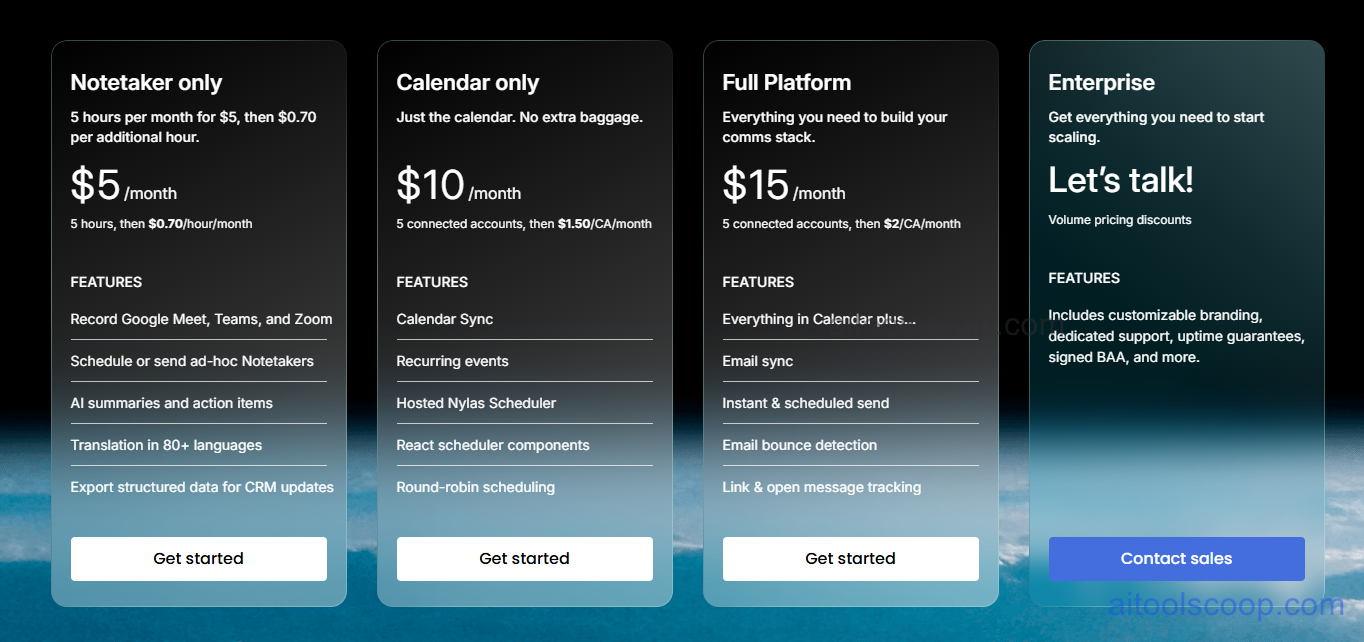
Nylas pricing — screenshot from nylas.com/pricing
Nylas uses a base fee + usage model. Each plan includes 5 connected accounts or hours; usage beyond that is billed per additional connected account (CA) or hour. A free sandbox is available for development.
Plan
Monthly Base
Includes
What's included
Free Sandbox
Free
Dev/test only
Full API access in sandbox mode for development and testing. Not for production use.
Notetaker
$5/mo
5 hours/mo
AI meeting bot: joins calls, transcribes, speaker detection, AI summaries, action items. $0.70/additional hour.
Calendar
$10/mo
5 CAs/mo
Calendar API only — read/create/update events, availability queries, scheduler component. $1.00/additional CA/mo.
Volume discounts, customisable branding, dedicated support, uptime guarantees, signed BAA, advanced data residency options.
CA = Connected Account (one end-user email or calendar account linked through your app). Annual contract plans are available with volume discounts — contact Nylas sales. Always verify current rates at nylas.com/pricing.
Who Should Use Nylas?
Nylas is purpose-built for software development teams that need to embed email, calendar, or meeting intelligence features into their own SaaS products. It is not an end-user email client — it is an API infrastructure layer. CRM vendors, ATS providers, sales engagement platforms, HR tech companies, and scheduling tools are the primary use cases. Nylas is particularly strong when your product needs to connect to multiple email providers simultaneously (Gmail and Outlook in the same app) without building separate integrations for each. The free sandbox makes it easy to prototype. At scale, the per-connected-account pricing model is transparent and predictable. Teams with simple single-provider needs (Gmail only, for example) should also evaluate the Google Gmail API or Microsoft Graph API directly before committing to Nylas, as those free native APIs may cover basic requirements without a third-party cost layer.
Frequently Asked Questions
What is Nylas?
Nylas is a developer API platform that enables software teams to add email, calendar, contacts, and AI meeting intelligence features to their own products through a single unified API. It connects to Gmail, Google Calendar, Microsoft 365, Outlook, Exchange, and IMAP providers. Features include two-way email sync, calendar event management, an embeddable scheduling component, and the Nylas Notetaker — an AI meeting bot that joins video calls, transcribes conversations, and generates AI-powered summaries and action items.
How much does Nylas cost?
Nylas pricing is structured around a monthly base fee plus per-usage charges. The Notetaker plan costs $5/month for 5 hours, then $0.70 per additional hour. The Calendar plan is $10/month for 5 connected accounts, then $1.00 per additional connected account per month. The Full Platform (email + calendar + contacts) is $15/month for 5 connected accounts, then $1.50 per additional connected account per month. Enterprise plans with volume discounts and custom terms are available via sales. A free sandbox is available for development.
Does Nylas have a free plan?
Nylas offers a free sandbox environment for development and testing that gives full API access without a time limit. The sandbox is not intended for production use. For production apps with real end-user accounts, paid plans start at $5/month (Notetaker) or $10/month (Calendar). There is no permanent free production tier, but the sandbox is genuinely functional for building and evaluating the API before launching.
What AI features does Nylas include?
Nylas AI features include the Notetaker API — a meeting bot that joins Zoom, Google Meet, and Microsoft Teams calls, records and transcribes the session, detects and labels speakers, and generates AI summaries, key highlights, action items, and decision extractions. The platform also includes Smart Compose for generating contextual email draft suggestions based on thread history. These capabilities are delivered via API, so developers integrate them directly into their own product interfaces.
Is Nylas suitable for enterprise use?
Yes. Nylas is SOC 2 Type II certified, GDPR compliant, and offers data residency options for regulated industries. Enterprise plans include a signed Business Associate Agreement (BAA) for HIPAA-eligible use cases, dedicated support, uptime SLA guarantees, and customisable branding. Nylas is used by thousands of organisations including well-known SaaS companies that process large volumes of email and calendar data through the API in production. Enterprise pricing is negotiated based on connected account volume and contract terms.
Source: aitoolscoop.com — AI Tools & Agents Directory. Data verified May 2026.
💰
Pricing Plans
Plan
Monthly
Annual (billed yearly)
Starter
$5/mo
$5/mo
Free sandbox for development. Paid from $5/mo (Notetaker), $10/mo (Calendar), $15/mo (Full Platform). Usage-based per connected account. Enterprise custom.
Affiliate Disclosure: This page contains affiliate links. If you click and make a purchase, we may earn a small commission at no extra cost to you. We only recommend tools we genuinely believe in.
🎯 Explore More
Discover other curated resources from our platform
 Freemium