Buffer is a streamlined AI-powered social media scheduling and publishing tool offering a permanent free plan for up to 3 channels — with an AI writing assistant for captions and content ideas, a visual content calendar, Start Page link-in-bio builder, and per-channel pricing that keeps costs low for creators, solopreneurs, and small teams managing Instagram, TikTok, X, LinkedIn, Facebook, Pinterest, YouTube, and Mastodon.
AI Writing Assistant for caption drafts, content ideas, hashtag suggestions, and cross-platform rewrites — available on all plans including free
Multi-network scheduling to Instagram, Facebook, Twitter/X, LinkedIn, TikTok, Pinterest, YouTube, Google Business, and Mastodon
Per-channel pricing — pay per social channel, not per user, keeping costs predictable as teams grow
Visual content calendar with weekly and monthly views, drag-and-drop rescheduling, and evergreen content queue
Start Page link-in-bio page builder with click analytics — free for all Buffer users
Per-post and per-channel analytics with exportable reports on Essentials and above
Team collaboration with role-based permissions and draft approval workflows on Team plan
Tailored posts — customise copy, links, and media per platform from a single compose window
Ideas feature — built-in content brainstorm and drafting pad for capturing ideas before scheduling
4.3
★★★★★
Agent Performance Score — based on 31 reviews
Autonomy
4.6
Task Completion
4.3
Integration
4.4
Reliability
4.2
Ease of Use
4.5
Pros & Cons
👍 Strengths
Permanent free plan for up to 3 channels with 10 posts each — no time limit, no credit card required
AI Writing Assistant included on the free plan — rare among social media tools
Per-channel pricing keeps costs very low for small teams sharing a fixed number of accounts
Start Page link-in-bio included free — saves subscribing to a separate Linktree-style service
Clean, simple interface with minimal learning curve — fastest to onboard of all major SMM platforms
Supports Mastodon in addition to all major social networks
👎 Limitations
Free plan limited to 10 scheduled posts per channel — quickly insufficient for daily posting
No built-in social listening or brand mention monitoring
Analytics depth is limited compared to Hootsuite and Sprout Social
No AI-generated images or videos — purely a text and scheduling tool
Team approval workflows require the Team plan ($12/channel/mo) — unavailable on Essentials
Less suitable for agencies managing many client accounts compared to Vista Social's agency features
📖
About Buffer
Buffer (buffer.com) is a social media scheduling and publishing platform founded in 2010 in San Francisco, California. Originally built as a simple Twitter scheduling tool, Buffer has grown into a full-featured, multi-network publishing platform used by over 140,000 businesses and creators worldwide. Buffer is particularly well known for its clean, distraction-free interface, transparent company culture, and a genuine free plan that supports up to 3 social channels with no time limit — making it the go-to starting point for individuals, solopreneurs, content creators, and small teams getting organised on social media.
Buffer's approach is deliberately straightforward. Rather than building a platform that competes on feature depth with Hootsuite or Sprout Social, Buffer focuses on making social media scheduling and publishing as frictionless as possible. Its AI Assistant — available on all plans including free — helps users draft captions, generate content ideas, repurpose existing content, and adapt posts for different platforms. Buffer's unique per-channel pricing model means teams only pay for what they actually use, making it significantly more affordable than per-user competitors for small teams managing a fixed set of social accounts.
How Buffer Works as an AI Agent
Buffer operates as a lightweight social media publishing agent with embedded AI writing assistance. Users connect social channels, and Buffer provides a visual queue where scheduled posts are arranged in a drag-and-drop timeline. The AI Assistant sits within the post composer: users type a rough idea or brief, and the AI generates caption drafts in multiple tones, suggests relevant hashtags, or rephrases existing copy for a different platform's conventions. Start Page — Buffer's built-in link-in-bio tool — allows creators to publish a personalised landing page that aggregates links, products, and content from all channels, with click analytics included. For teams using the Team plan, multiple users can collaborate on the same channel queue with role-based permissions, making Buffer functional for small agencies or brand teams without the per-user pricing of enterprise platforms.
Key Features
AI Writing Assistant — generate caption drafts, content ideas, hashtag suggestions, and platform-adapted rewrites from a brief or existing text, available on all plans including free
Multi-network scheduling — schedule and publish posts to Instagram (Feed, Reels, Stories), Facebook, Twitter/X, LinkedIn, TikTok, Pinterest, YouTube, Google Business Profile, and Mastodon
Per-channel pricing — pay per social channel connected rather than per user — a team of 5 sharing the same 3 channels pays the same as a solo creator, keeping costs predictable
Visual content calendar — weekly and monthly calendar view of all scheduled posts across channels, with drag-and-drop rescheduling and a content queue for evergreen posts
Start Page (link-in-bio) — built-in link-in-bio page builder for Instagram and TikTok with click analytics, product links, and social feed integration — free for all Buffer users
Analytics — per-post and per-channel performance metrics including reach, engagement, impressions, and follower growth, with export options on paid plans
Ideas — a built-in brainstorm pad for capturing content ideas and drafts before they are ready to schedule, keeping the content pipeline organised
Team collaboration — multiple team members can manage shared channel queues with role-based permissions (editor, approver, analyst) on the Team plan
Tailored posts — customise post copy, links, and media per platform from a single compose window without creating separate posts for each channel
Buffer Pricing
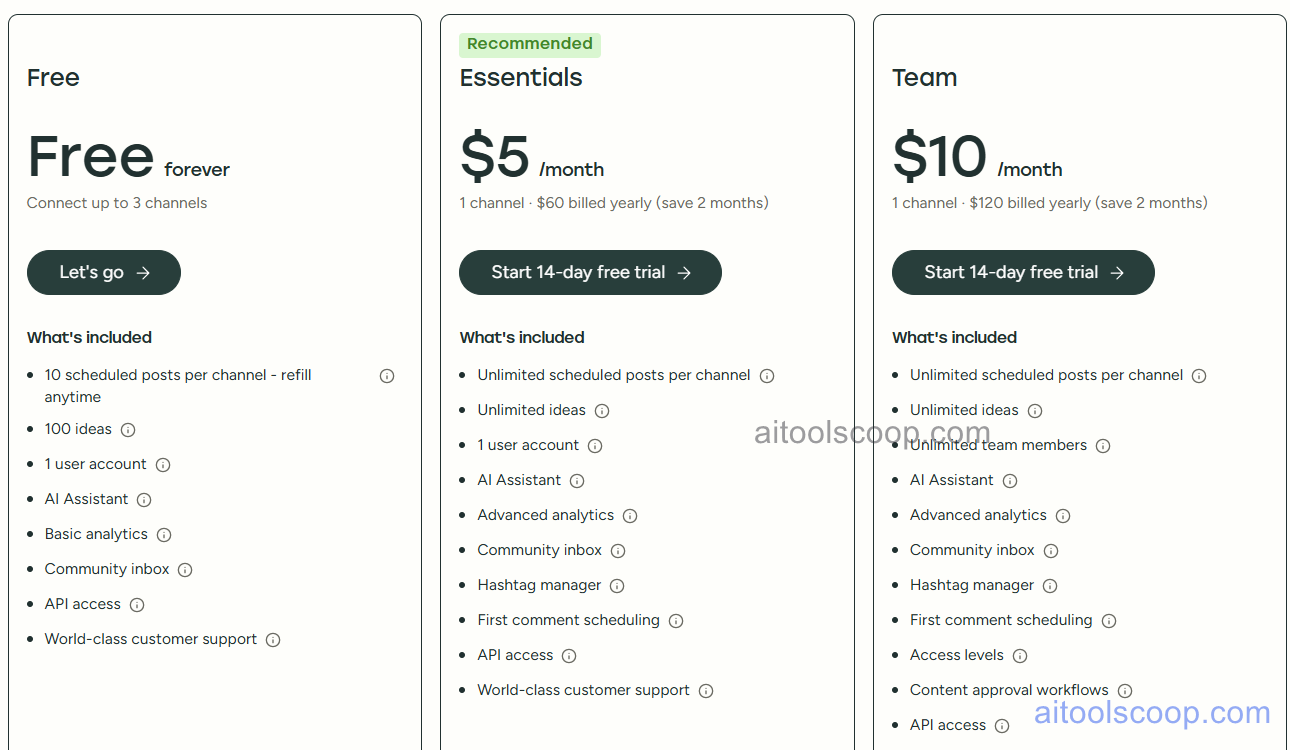
Buffer pricing — screenshot from buffer.com/pricing
Buffer uses per-channel pricing, not per-user. All prices are per social channel per month. The free plan supports up to 3 channels with 10 scheduled posts per channel. Paid plans unlock more channels, unlimited scheduling, and team features. Annual billing saves approximately 17% compared to monthly.
Plan
Monthly
Annual (per channel/mo)
What's included
Free
$0
$0
Up to 3 social channels, 10 scheduled posts per channel, AI Writing Assistant, Start Page link-in-bio, and basic analytics. Unlimited team members can be invited at no extra cost on the free plan.
Essentials
$6/channel/mo
$5/channel/mo Save 17%
Unlimited scheduled posts per channel, full analytics with exportable reports, engagement inbox for replying to comments, and no channel limit. AI Writing Assistant included.
Team
$12/channel/mo
$10/channel/mo Save 17%
Everything in Essentials plus unlimited team members with role-based permissions, draft approval workflows, and team collaboration tools. Ideal for agencies and multi-person teams.
Pricing is per channel, not per user. A team managing 5 channels on Essentials pays $30/month. Free plan supports up to 3 channels with 10 posts/channel. Annual billing saves ~17%. Verify current rates at buffer.com/pricing.
Who Should Use Buffer?
Buffer is the ideal starting point for individuals, content creators, solopreneurs, and small teams who want a clean, simple, and affordable social media scheduling tool. The free plan — with 3 channels and 10 scheduled posts each — is a genuinely useful plan for personal brands or very small businesses evaluating social media management. The per-channel pricing model makes Essentials and Team plans particularly cost-effective for teams sharing a fixed set of channels, since adding team members does not increase the cost. Buffer is not the right choice for organisations that need deep social listening, CRM integration, advanced analytics, or complex approval workflows — those needs are better served by Sprout Social or Hootsuite. Teams that primarily produce visual content at high volume and need AI-generated graphics should look at Predis.ai to complement or replace Buffer's content creation capabilities.
Frequently Asked Questions
What is Buffer?
Buffer is a social media scheduling and publishing platform used by over 140,000 businesses and creators. It supports scheduling and publishing to Instagram, Facebook, Twitter/X, LinkedIn, TikTok, Pinterest, YouTube, Google Business Profile, and Mastodon. Buffer includes an AI Writing Assistant for caption drafts and content ideas, a Start Page link-in-bio builder, a visual content calendar, and per-channel pricing that keeps costs low for small teams. A permanent free plan is available for up to 3 channels with 10 scheduled posts each.
Does Buffer have a free plan?
Yes. Buffer's free plan is permanent (not a trial) and includes up to 3 social channels, 10 scheduled posts per channel, the AI Writing Assistant, Start Page link-in-bio, and basic analytics — at no cost and with no time limit. It also allows unlimited team member invitations on the free plan, which is unusual and makes it viable for very small teams. Paid plans start at $6/channel/month (Essentials) or $5/channel/month (annual billing) for unlimited scheduled posts and enhanced analytics.
How much does Buffer cost?
Buffer uses per-channel pricing. Free is $0 for up to 3 channels. Essentials is $6/channel/month (monthly) or $5/channel/month (annual), with unlimited scheduling and full analytics. Team is $12/channel/month or $10/channel/month annually, adding team collaboration, draft approval workflows, and role-based permissions. For example, a team managing 5 channels on the Essentials plan pays $30/month or $25/month annually — not per user. Annual billing saves approximately 17%.
What AI features does Buffer include?
Buffer's AI Writing Assistant is available on all plans, including the free tier. It generates social media caption drafts from a brief or topic, suggests alternative phrasings, adapts post copy for different platforms (e.g. shortening a LinkedIn post for Twitter/X), and provides content ideas when the queue is running low. The AI Assistant also helps repurpose existing content — for example, turning a blog post URL into multiple social media snippets. Buffer does not include AI-generated images or videos; for AI visual content generation, Predis.ai is a complementary option.
What is Buffer's Start Page?
Start Page is Buffer's built-in link-in-bio page builder, available for free on all Buffer plans including the free tier. It creates a personalised landing page — similar to Linktree or Later's Link in Bio — where creators can aggregate links to content, products, social profiles, and external resources in a single shareable URL suitable for Instagram and TikTok bios. Start Page includes click analytics to track which links drive the most traffic, and it can be customised with brand colours, fonts, and profile images. No additional subscription is required beyond a Buffer account.
Source: aitoolscoop.com — AI Tools & Agents Directory. Data verified May 2026.
💰
Pricing Plans
Plan
Monthly
Annual (billed yearly)
Starter
$6/mo
$5/mo Save 17%
Free plan available (3 channels, 10 posts/channel). Per-channel pricing: Essentials $6/channel/mo or $5/channel/mo annual. Team $12/channel/mo or $10/channel/mo annual.
Affiliate Disclosure: This page contains affiliate links. If you click and make a purchase, we may earn a small commission at no extra cost to you. We only recommend tools we genuinely believe in.
🎯 Explore More
Discover other curated resources from our platform
 Freemium