Monday.com is an AI-powered work management platform and automation agent that helps teams plan projects, automate repetitive workflows, track progress, and collaborate — with native AI features for task generation, status updates, and intelligent automation across boards.
Monday AI assistant for task summaries, text generation, and board data Q&A
Natural language automation builder — describe workflows in plain English, AI generates the logic
AI formula column for generating spreadsheet formulas without writing syntax
Smart status updates using AI to read item progress and suggest status changes
AI writing assistant inside Monday Workdocs for drafting briefs, notes, and reports
No-code automation engine with 200+ templates for notifications, approvals, and cross-board updates
Real-time dashboards aggregating data across boards with charts, timelines, and workload views
200+ native integrations including Slack, Google Workspace, Microsoft Teams, Jira, and Salesforce
Monday CRM module with AI-powered lead scoring and email automation
Monday Dev workspace with sprint planning, bug tracking, and GitHub/GitLab integration
4.5
★★★★★
Agent Performance Score — based on 186 reviews
Autonomy
4.8
Task Completion
4.5
Integration
4.6
Reliability
4.4
Ease of Use
4.7
Pros & Cons
👍 Strengths
Free plan available for up to 2 seats with no time limit
Monday AI embedded in existing workflows — no separate tool required
Highly flexible board system adapts to almost any project or process type
200+ automation templates and natural language automation builder on paid plans
Strong integration ecosystem with 200+ native connectors
Multiple specialised products (CRM, Dev, Service) under one platform roof
👎 Limitations
Minimum 3 seats on all paid plans — expensive for very small teams or solo users
Seat bucket model means a team of 6 pays for 10 seats — hidden cost trap
Monday AI only available on Pro ($24/mo) and Enterprise — not on Basic or Standard
Automation action limits on lower tiers (250/month on Standard) can be restrictive for active teams
Pricing per seat adds up quickly at scale compared to flat-rate competitors
Dashboard cross-board aggregation limited on lower plans
📖
About Monday.com
Monday.com (monday.com) is a cloud-based work management and project management platform founded in 2012 and headquartered in Tel Aviv, Israel. It is used by over 225,000 organisations worldwide, ranging from small teams to enterprise companies including Coca-Cola, Canva, and Universal Music Group. The platform combines a flexible board-based interface with AI-powered automation to help teams manage projects, track tasks, coordinate workflows, and surface insights without switching between multiple tools.
Monday.com's AI capabilities — branded as Monday AI — are embedded directly into the platform. They include AI-generated task summaries, automated status updates, intelligent formula suggestions, natural language workflow creation, and predictive project insights. The AI layer sits on top of the existing board, dashboard, and automation infrastructure, meaning teams get AI assistance within their existing workflows rather than having to adopt a separate tool.
How Monday.com Works as an AI Agent
Monday.com operates as a workflow automation and project intelligence agent. Users build boards (spreadsheet-like views) and connect items across projects. Monday AI then reads board data to generate summaries, flag at-risk tasks, suggest next steps, and automatically update statuses based on connected triggers. The no-code automation engine lets teams create "if this, then that" rules — for example, automatically notifying a stakeholder when a task is overdue, or moving an item to a new stage when a form is submitted. Monday AI extends this by allowing natural language automation creation: users describe what they want in plain English and the platform builds the automation rule.
Key Features
Monday AI assistant — generates task summaries, rewrites updates, answers questions about board data, and drafts content directly inside items
AI automation builder — create complex automation rules using natural language; describe the trigger and action in plain English and Monday AI generates the logic
Smart status updates — AI reads item progress and connected subtasks to suggest or auto-populate status fields
AI formula column — generate spreadsheet-style formulas using natural language prompts rather than writing formula syntax manually
Workdocs with AI — AI writing assistant inside Monday Workdocs for drafting meeting notes, project briefs, and status reports
No-code automation engine — 200+ automation templates covering task assignment, notifications, due date reminders, approval flows, and cross-board updates
Dashboards and reporting — real-time dashboards aggregating data across multiple boards with charts, timelines, and workload views
Integrations — native integrations with Slack, Google Workspace, Microsoft Teams, Jira, Salesforce, GitHub, Zoom, and 200+ other tools
Monday CRM — built-in CRM module with AI-powered lead scoring, deal tracking, and email automation
Monday Dev — software development workspace with sprint planning, bug tracking, and GitHub/GitLab integration
Monday.com Pricing
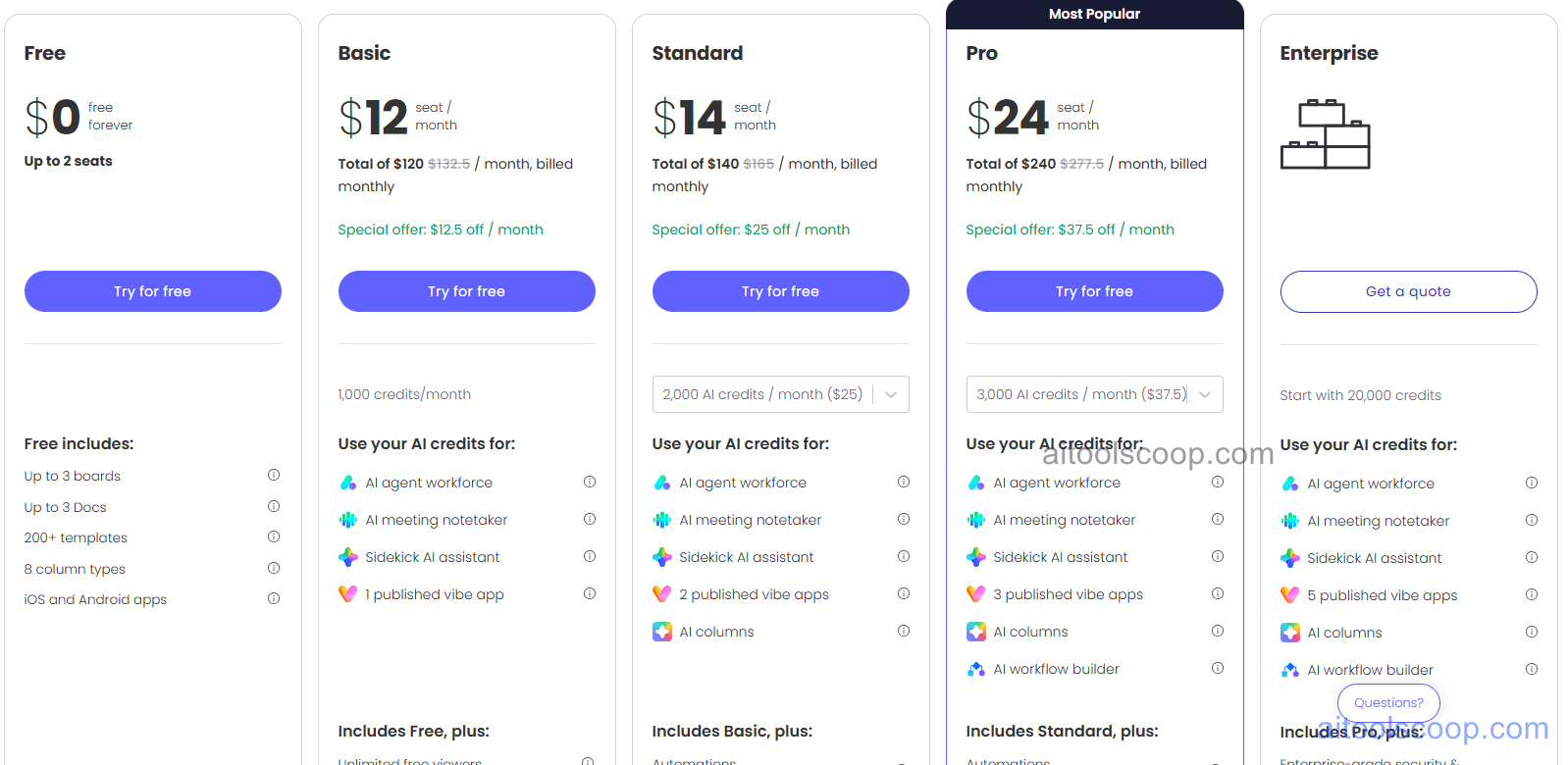
Monday.com pricing — screenshot from monday.com/pricing
All prices are per seat per month. Paid plans require a minimum of 3 seats. Annual billing saves 18–25% depending on plan.
Plan
Monthly
Annual (per seat/mo)
What's included
Free
Free
Free
Up to 2 seats, 3 boards, unlimited docs, 200+ templates, iOS/Android apps. No automations or integrations.
All paid plans require a minimum of 3 seats. Seats are sold in buckets — a team of 6 pays for 10. Monday AI available on Pro and Enterprise plans only. Always verify current rates at monday.com/pricing.
Who Should Use Monday.com?
Monday.com suits teams of any size that manage projects, campaigns, or operational workflows and want to reduce manual coordination overhead. It is particularly strong for marketing, operations, product, and HR teams who need a flexible, visual way to track work across departments. The AI automation features make it especially useful for teams running repetitive approval workflows, client onboarding sequences, or cross-departmental handoffs. Developers and software teams should evaluate Monday Dev specifically. Very small teams with simple needs may find the free plan sufficient, while the per-seat pricing model can add up quickly at scale — particularly because seats are sold in buckets, meaning a team of 6 pays for 10 seats. Teams that need deep developer-centric project management as a primary workflow may prefer Linear or Jira.
Frequently Asked Questions
What is Monday.com?
Monday.com is a cloud-based work management platform that combines project tracking, team collaboration, and AI-powered automation in a single tool. It uses a flexible board-based interface where teams organise tasks, projects, and workflows. Monday AI adds generative AI features including task summaries, natural language automation creation, AI formula generation, and smart status updates — all embedded within the existing platform rather than as a separate product.
How much does Monday.com cost?
Monday.com has five plans. Free is $0 for up to 2 seats. Basic is $12/seat/month billed monthly, or $9/seat/month billed annually. Standard is $14/seat/month monthly, or $12/seat/month annually. Pro is $24/seat/month monthly, or $19/seat/month annually, and includes Monday AI features. Enterprise pricing is custom. All paid plans require a minimum of 3 seats, and seats are sold in buckets — a team of 6 pays for 10 seats.
Does Monday.com have a free plan?
Yes, Monday.com has a permanent free plan for up to 2 seats. It includes unlimited docs, 200+ templates, and up to 3 boards. The free plan does not include automations, integrations, timeline or Gantt views, or Monday AI features. Paid plans start at $12/seat/month (Basic) billed monthly, or $9/seat/month on annual billing.
What AI features does Monday.com include?
Monday AI features are available on Pro and Enterprise plans. They include an AI assistant for generating task summaries, rewriting text, and answering questions about board data; a natural language automation builder for creating workflow rules by describing them in plain English; AI formula columns for generating spreadsheet formulas without writing syntax; smart status suggestions based on item progress; and AI writing assistance inside Monday Workdocs for drafting briefs, notes, and reports.
Is Monday.com safe for business use?
Yes. Monday.com is ISO 27001 certified, SOC 2 Type II compliant, and GDPR compliant. Enterprise plans add HIPAA compliance, advanced permissions, audit logs, and enterprise-grade security controls. Monday.com is used by over 225,000 organisations including Fortune 500 companies. Always review the official privacy policy and data processing agreements before connecting sensitive business data.
Source: aitoolscoop.com — AI Tools & Agents Directory. Data verified May 2026.
💰
Pricing Plans
Plan
Monthly
Annual (billed yearly)
Starter
$12/mo
$9/mo Save 25%
Free plan available (up to 2 seats). Paid plans from $12/seat/mo (monthly) or $9/seat/mo (annual). Min 3 seats required. Monday AI on Pro & Enterprise only.
Affiliate Disclosure: This page contains affiliate links. If you click and make a purchase, we may earn a small commission at no extra cost to you. We only recommend tools we genuinely believe in.
🎯 Explore More
Discover other curated resources from our platform
 Freemium