Copper CRM is a Google Workspace-native CRM that automatically captures contacts and emails from Gmail, tracks deals in a visual pipeline, and uses AI to surface follow-up recommendations for relationship-driven sales teams.
Native Gmail sidebar auto-logs all emails, contacts, and meetings to CRM records
Automatic data capture from Gmail and Google Calendar — zero manual entry
Visual drag-and-drop deal pipeline with customizable stages
AI recommendations for follow-up actions and stale deal alerts
Workflow automation triggered by deal stage changes and activity signals
Pipeline reporting, win/loss analysis, and revenue forecasting
Google Meet and Calendar sync linking meetings automatically to deal records
70+ integrations including Slack, Mailchimp, and Zapier
4.3
★★★★★
Agent Performance Score — based on 35 reviews
Autonomy
4.6
Task Completion
4.3
Integration
4.4
Reliability
4.2
Ease of Use
4.5
Pros & Cons
👍 Strengths
Zero manual data entry — Gmail captures everything automatically
Lives inside Gmail — no context switching required
Affordable entry price at $9/month annually
14-day free trial available
Ideal for Google Workspace teams with no CRM experience
👎 Limitations
No free plan
Only valuable for Google Workspace users — limited outside Gmail ecosystem
AI recommendations and automation require Professional plan ($59/mo annual)
Starter plan limited to 3 users
Less powerful than Salesforce or HubSpot for complex sales processes
📖
About Copper CRM
Copper CRM (copper.com) is a CRM platform built natively for Google Workspace. It lives inside Gmail and Google Calendar, automatically pulling contact details, email threads, and meeting history into deal records without any manual data entry. Copper is designed for teams that run their business primarily through Google tools and want a CRM that stays out of the way.
Copper focuses on relationship management: tracking deals, logging all communication automatically, and surfacing context when a rep needs to follow up. Its AI layer recommends next actions, flags stale deals, and helps prioritize the pipeline based on activity signals from Gmail and Calendar.
How Copper Works as an AI Agent
Copper's AI monitors Gmail and Calendar activity continuously. When a contact emails or a meeting is scheduled, Copper automatically updates the relevant deal record. It flags deals where activity has gone quiet, recommends follow-up actions, and surfaces relationship context — who last talked to a contact, when, and what was discussed — without the rep needing to log anything manually.
Key Features
Gmail & Google Workspace Integration — native sidebar in Gmail auto-logs all emails, contacts, and meetings to CRM records
Automatic Data Capture — contacts, companies, and communication history populated automatically from Gmail
Visual Pipeline — drag-and-drop deal pipeline with customizable stages
AI Recommendations — surfaces follow-up suggestions and flags stale deals based on Gmail activity
Workflow Automation — trigger-based automations for deal stage changes, task creation, and notifications
Google Meet & Calendar Sync — meeting scheduling and notes linked automatically to deal records
Integrations — connects with Slack, Mailchimp, Zapier, and 70+ business apps
Copper CRM Pricing
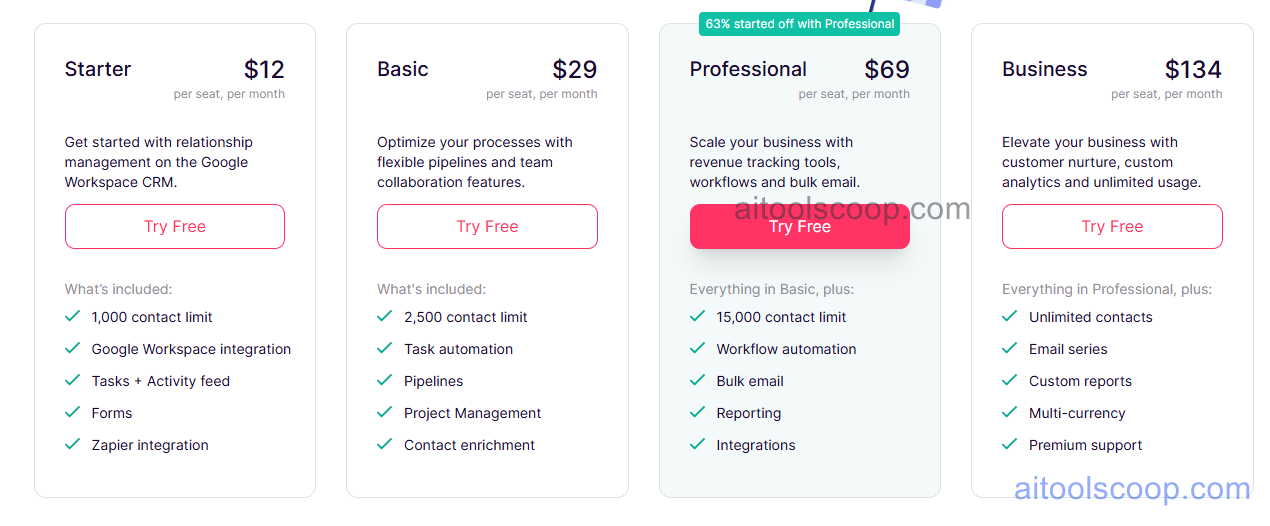
Copper CRM pricing — screenshot from copper.com
Starter — $12/month (monthly) or $9/month (billed annually) — Gmail integration, basic pipeline, up to 3 users.
Basic — $29/month (monthly) or $23/month (billed annually) — unlimited users, bulk email, Google Sheets integration, reporting.
Professional — $69/month (monthly) or $59/month (billed annually) — workflow automation, AI recommendations, custom reporting, integrations.
Business — $134/month (monthly) or $99/month (billed annually) — advanced automation, lead scoring, priority support, custom fields.
No free plan. 14-day free trial available. All prices per user per month. Annual billing saves up to 25%. Always verify current rates at copper.com/pricing.
Who Should Use Copper CRM?
Copper suits small to mid-size teams that run their entire business on Google Workspace and want a CRM that requires zero manual data entry. It is ideal for professional services, agencies, and consulting firms where relationship management and communication history are more important than heavy sales automation. Teams not using Google Workspace will find limited value, as the core differentiator is the Gmail and Calendar integration.
Frequently Asked Questions
What is Copper CRM?
Copper CRM is a Google Workspace-native CRM that automatically captures contacts, emails, and meetings from Gmail and Google Calendar without manual data entry. It tracks deals in a visual pipeline and uses AI to surface follow-up recommendations for relationship-driven sales teams.
Is Copper CRM free?
Copper CRM does not have a free plan. A 14-day free trial is available. Paid plans start at $9 per user per month billed annually. After the trial, a paid subscription is required to continue.
How much does Copper CRM cost?
Copper Starter costs $12/month or $9/month billed annually per user. Basic is $29/month or $23/month annually. Professional is $69/month or $59/month annually. Business is $134/month or $99/month annually. Annual billing saves up to 25%.
Does Copper CRM work with Gmail?
Yes — Gmail integration is Copper's core feature. It adds a sidebar inside Gmail that automatically logs emails, contacts, and meetings to CRM records without any manual input. It also integrates with Google Calendar and Google Meet to sync meeting history to deal records.
Is Copper CRM good for non-Google Workspace users?
No. Copper is built specifically for Google Workspace and its primary value comes from native Gmail and Calendar integration. Teams using Outlook or other email platforms will not benefit from its core features and should consider a general-purpose CRM instead.
💰
Pricing Plans
Plan
Monthly
Annual (billed yearly)
Starter
$12/mo
$9/mo Save 25%
Growth
$29/mo
$23/mo Save 21%
Pro
$69/mo
$59/mo Save 14%
Enterprise
$134/mo
$99/mo Save 26%
No free plan. 14-day free trial available. All prices per user per month. Annual billing saves up to 25%.
Affiliate Disclosure: This page contains affiliate links. If you click and make a purchase, we may earn a small commission at no extra cost to you. We only recommend tools we genuinely believe in.
🎯 Explore More
Discover other curated resources from our platform
 Paid
Paid