AI Meeting Transcription Without the Bot
Tactiq (tactiq.io) is a lightweight AI meeting transcription tool delivered as a Chrome extension that works seamlessly with Google Meet, Zoom, and Microsoft Teams. Without any bots joining the call or intrusive setup, Tactiq captures and transcribes meeting conversations in real time directly within the browser. After each meeting, Tactiq's AI generates summaries, identifies action items, and provides structured meeting outputs powered by GPT. Notes can be shared with teammates, exported to popular tools like Notion, Confluence, Slack, and Google Docs, or saved to a searchable meeting history library. Tactiq's frictionless approach makes it the preferred meeting transcription tool for individuals and teams who want results without disrupting meeting dynamics.
How Tactiq Works
Install the Tactiq Chrome extension and connect your Google account. When you join a Google Meet, Zoom, or Teams call in Chrome, Tactiq automatically activates and begins capturing the live transcript in a sidebar panel alongside your meeting. Speaker names are tagged automatically for each line of the conversation. Highlight important moments during the meeting by clicking key sentences. When the meeting ends, trigger an AI summary with a single click — Tactiq generates a concise meeting recap, a list of action items, and optional custom outputs based on GPT prompts. Export the transcript and notes to Notion, Confluence, Slack, Google Docs, or copy them directly. All past transcripts are stored in a searchable Tactiq library accessible from the web app.
Key Features
- Chrome extension — lightweight browser tool with no bot required and no meeting disruption
- Real-time transcription — live speech-to-text in a sidebar for Google Meet, Zoom, and Teams
- AI meeting summaries — GPT-powered post-meeting recaps generated with one click
- Action item detection — AI identifies and lists tasks from meeting conversations
- Live highlighting — mark important moments during meetings for quick reference
- Speaker tagging — automatically labels each participant's contributions in the transcript
- Custom AI prompts — generate custom outputs like follow-up emails, project briefs, and reports
- Multi-platform integrations — export to Notion, Confluence, Slack, Google Docs, and more
- Searchable meeting library — access and search all past transcripts in the Tactiq web app
- Team sharing — distribute meeting notes to absent colleagues instantly after calls
Tactiq Pricing
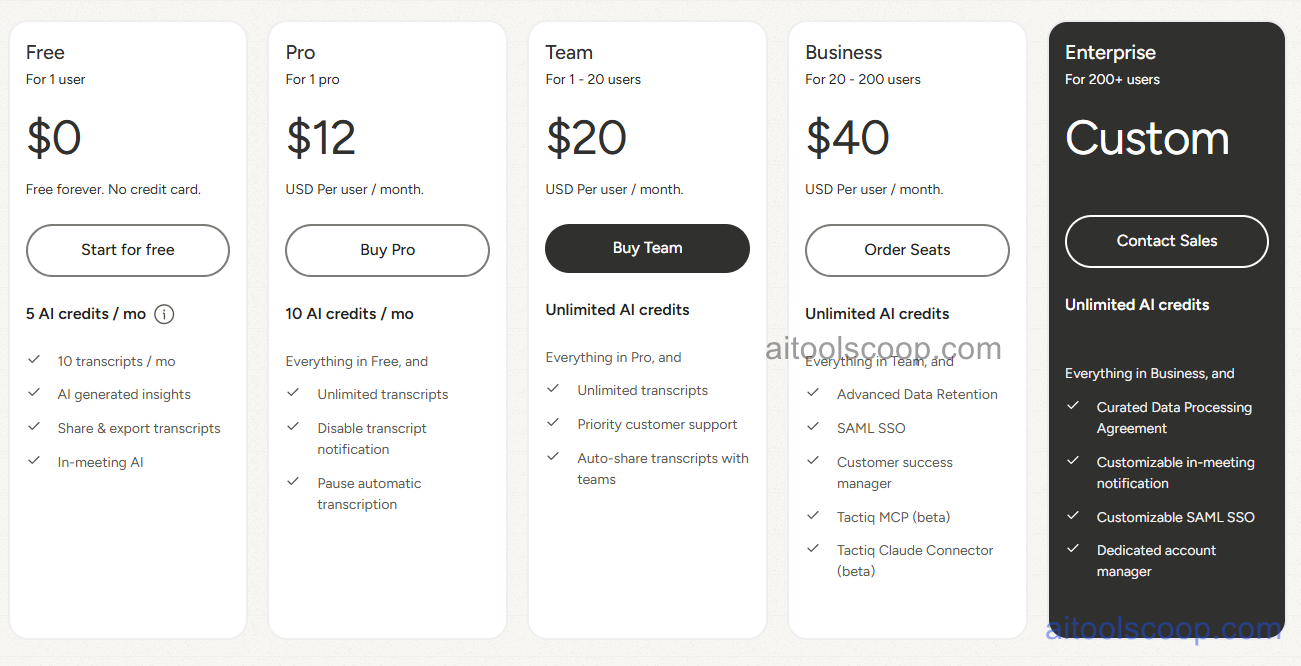
- Free — limited AI summaries per month, real-time transcription, basic export, single user, searchable history.
- Personal — $12/month or $8/month billed annually ($96/year) — unlimited AI summaries, all export integrations, custom AI prompts, unlimited meeting history, priority support.
- Teams — $20/month or $16.67/month billed annually ($200.04/year) — all Personal features, shared team workspace, collaborative meeting library, team admin controls, usage analytics.
- Business — $40/month or $29.16/month billed annually ($349.92/year) — all Teams features, advanced integrations, CRM sync, priority feature access, dedicated onboarding.
- Enterprise — Custom pricing — all Business features, SSO, unlimited users, custom integrations, SLA guarantees, enterprise security, dedicated account management.
Always check the latest rates on the official website. For more AI tool reviews, visit aitoolscoop.com.
Who Should Use Tactiq?
Tactiq is ideal for professionals who attend multiple meetings daily and need automated notes without disrupting call dynamics, sales teams capturing client conversations and generating CRM-ready follow-up summaries, product managers documenting decisions and action items from sprint meetings, remote workers collaborating across time zones who share meeting notes with absent colleagues, and startup teams managing high meeting volumes with limited administrative support. The Free plan covers occasional users, the Personal plan suits individual power users, the Teams plan fits collaborative departments, and the Business plan serves larger organizations needing CRM integration and advanced workflows.