
Chrome Screen Recorder for Teachers
Screencastify (screencastify.com) is a lightweight screen recording tool built as a Chrome extension, designed primarily for educators creating instructional videos and tutorials. Emphasizing simplicity and accessibility, Screencastify allows users to record screens, browser tabs, or webcam with one click directly from Chrome, then provides basic editing tools including trim, crop, merge, and annotation. The platform integrates deeply with Google Classroom and Google Drive, making it popular in educational institutions using Google Workspace. Videos are automatically saved to Google Drive with shareable links, eliminating download and upload workflows.
How Screencastify Works
Install the Screencastify Chrome extension and sign in with Google account. Click the extension icon and select recording mode: Browser Tab (records a specific tab), Desktop (full screen), or Webcam Only. Enable microphone, system audio, and webcam overlay as needed. Click Record and Screencastify captures your screen activity. Use annotation tools during recording including pen, text, and spotlight effects. Click Stop when finished, and the video automatically saves to your Google Drive. Open the Screencastify editor to trim clips, crop sections, merge multiple recordings, and add text overlays. Enable transcription for auto-generated captions and subtitles. Export the final video or share directly via Google Classroom, Google Drive link, YouTube, or download as MP4.
Key Features
- One-click recording — capture browser tabs, desktop, or webcam from Chrome toolbar
- Annotation tools — pen, text, spotlight, and mouse highlight during recording
- Google Drive integration — automatic save to Drive with instant shareable links
- Google Classroom integration — share recordings directly to class assignments
- Webcam overlay — picture-in-picture camera feed for personal instruction
- Auto-transcription — speech-to-text captions and subtitles generation
- Simple editor — trim, crop, merge, and text overlay tools
- Interactive questions — embed questions in videos for student engagement
- Video analytics — track views and engagement for educational content
- Offline recording — capture without internet, uploads when connection restored
Screencastify Pricing
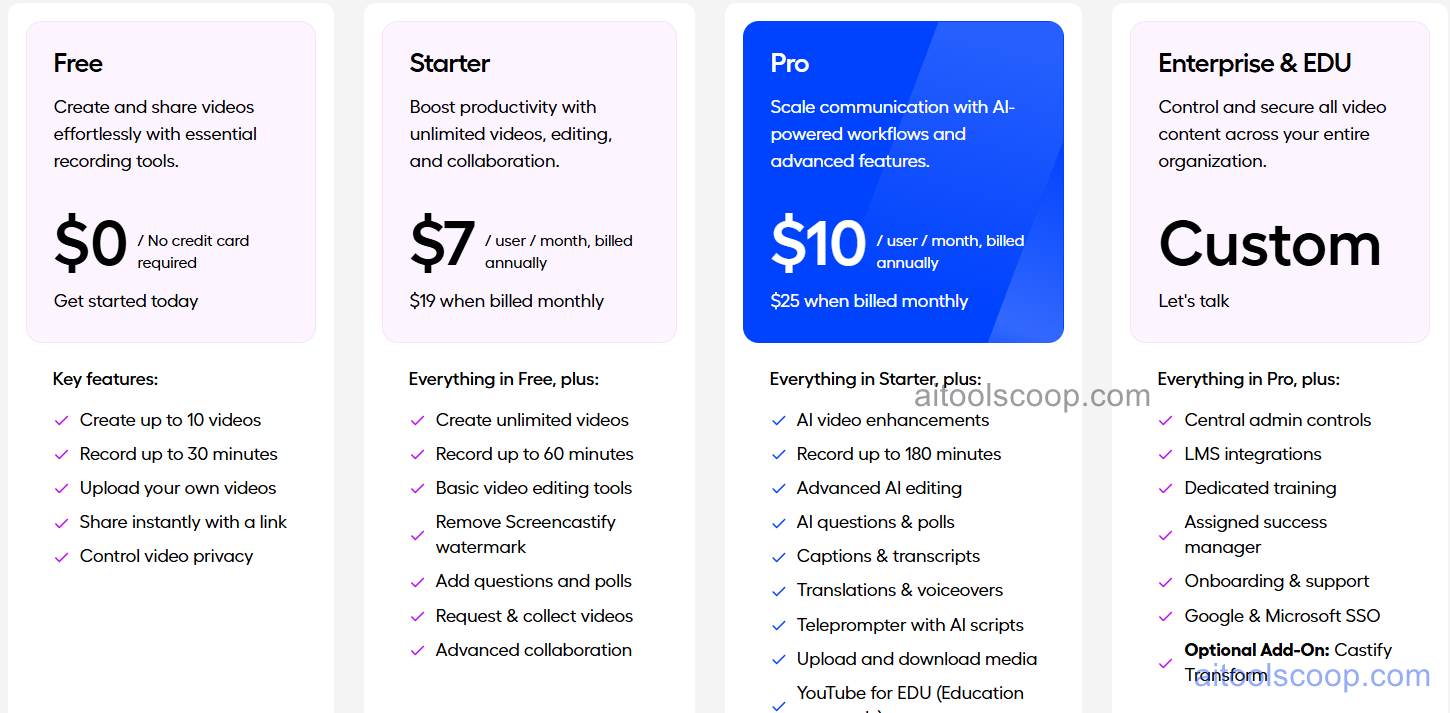
- Free — $0/month — unlimited recordings, 5 minutes per video, Screencastify watermark, basic editing tools, Google Drive integration.
- Unlimited — $7/month — unlimited video length, no watermark, auto-transcription, advanced editing, interactive questions, priority support.
- Teams — $10/month/user — all Unlimited features, team collaboration, shared video libraries, usage analytics, admin controls.
- Enterprise — Custom pricing — volume licensing for schools and districts, SSO, advanced security, dedicated support, custom integrations.
Always check the latest rates on the official website. For more AI tool reviews, visit aitoolscoop.com.
Who Should Use Screencastify?
Screencastify is perfect for K-12 teachers creating lesson videos and flipped classroom content, higher education instructors recording lectures and supplemental materials, students producing video projects and presentations, corporate trainers creating quick how-to videos and SOPs, tech support teams documenting troubleshooting steps, and anyone in Google Workspace ecosystems needing simple screen recording. The free plan suits students and educators with short-form content needs, while the Unlimited plan serves teachers recording full-length lessons. The Teams plan fits schools and departments requiring shared libraries, and Enterprise serves districts with centralized management needs.