

Home/ AI Tools /AI Writing Tools /Compose AI
Compose AI Freemium
🤖 AI Writing Tools
#21 in AI Writing Tools

Compose AI

Compose AI is a Chrome extension that autocompletes sentences, generates emails from short prompts, and rephrases text across any website where you type. Free plan available. Pro from $14.99/month.

4.0 / 5 Freemium From $14.99/mo
Quick Info
💰 Pricing$14.99/mo
⭐ Rating4.0 / 5
🆓 Free Plan✅ Yes
📂 CategoryAI Writing Tools
🌐 WebsiteVisit ↗
🕐 Last UpdatedApr 8, 2026
🔀 Alternatives25 tools
Verified Data Updated Apr 8, 2026
Independently Reviewed No paid placements
Detailed Analysis Hands-on testing
Key Features
  • Autocomplete suggests sentence completions as you type — press Tab to accept across all websites
  • Generate anything command (//) creates text, emails, and content from short descriptions anywhere you type
  • One-click email reply generation that references context from the original thread
  • Rephrase rewrites highlighted text to be friendlier, professional, shorter, or longer on demand
  • Personalized voice learns your unique writing style over time for style-matched suggestions
  • Real-time grammar and spelling correction across all browser text fields
  • Multi-language support in multiple writing styles
  • Chrome extension, iOS app, and Android app for cross-device access
4.0
Overall Rating
Ease of Use
4.2
Features
4.0
Value
3.7
Performance
4.1
Support
3.9
Pros & Cons
👍 Pros
  • Works across 500+ websites in your browser without switching tabs or copying text
  • Personalized voice learning improves suggestions the more you use the tool
  • Free plan includes 1,500 words per month — generous compared to most competitors
  • Saves up to 40% of writing time according to user reports for high-volume emailers
  • Annual Pro at $9.99/month is competitive for daily professional communication
👎 Cons
  • Chrome-only for desktop — no native desktop app or Microsoft Word integration
  • Free plan 1,500 words per month is low for daily professional use
  • Autocomplete suggestions can occasionally feel generic before personalization kicks in
  • Not suited for long-form content creation — optimized for short-form writing tasks
  • Business plan at $44.99/month is expensive for small teams
📖

About Compose AI

Compose AI (compose.ai) is an AI-powered writing assistant delivered as a Chrome extension that works across any website where you type — Gmail, Google Docs, LinkedIn, Slack, Notion, and hundreds more. Its core capability is intelligent autocomplete: as you type, Compose AI suggests sentence completions based on your personal writing style, which it learns over time. The platform also generates full emails from short natural-language prompts, rewrites existing text for tone and length, and provides one-click professional email replies.

How Compose AI Works

After installing the Chrome extension, Compose AI activates wherever you type in your browser. Press Tab to accept any autocomplete suggestion. Type // to open the generate-anything command and describe what you want written. To rephrase existing text, highlight it and select the desired tone — friendlier, more professional, shorter, or longer. For emails, open a message and press Option+G (or Alt+G) to generate a contextual reply based on the email thread. The platform continuously learns your writing patterns to personalize future suggestions.

Key Features

  • Autocomplete — suggests sentence completions as you type across all websites; press Tab to accept
  • Generate anything (//) — type // anywhere to generate text, emails, blog paragraphs, or any content from a short description
  • Email reply generation — one-click professional reply that references context from the original email thread
  • Rephrase — reword highlighted text to be friendlier, more professional, shorter, or longer
  • Personalized voice — learns your unique writing style over time to offer style-matched suggestions
  • Grammar correction — real-time grammar and spelling detection across all text fields
  • Multi-language support — works across multiple languages in supported writing styles
  • Cross-platform — Chrome extension, iOS app, and Android app available

Compose AI Pricing
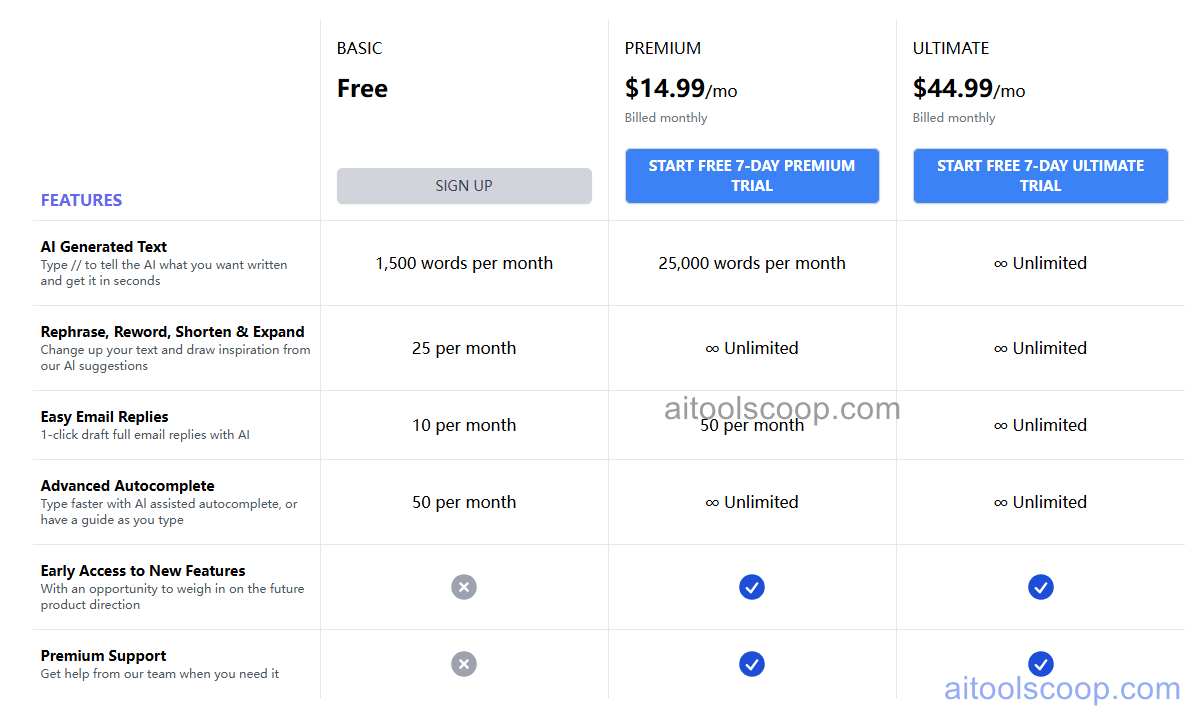
Compose AI pricing plans
Compose AI pricing — screenshot from compose.ai
  • Free — $0/month — 1,500 words/month, basic autocomplete, email reply, and rephrase features.
  • Pro — $14.99/month — unlimited access to all features, personalized voice training, priority processing. Annual plan at $9.99/month.
  • Business — $44.99/month — everything in Pro plus team management, advanced integrations, and admin controls. Annual plan at $29.99/month.

Always check the latest rates on the official website. For more AI tool reviews, visit aitoolscoop.com.

Who Should Use Compose AI?

Compose AI is built for busy professionals, executives, and customer-facing teams who write large volumes of emails, Slack messages, and documents daily. Its key advantage over other AI writing tools is that it works everywhere you already type in your browser — no tab switching, no copy-pasting. It is particularly valuable for professionals who need to maintain a consistent professional tone across all communications without manually editing every message.


💰

Pricing Plans

Plan Price Includes
Pro $14.99/mo Full access + priority support
Check Current Pricing →
Affiliate Disclosure: This page contains affiliate links. If you click and make a purchase, we may earn a small commission at no extra cost to you. We only recommend tools we genuinely believe in.

🎯 Explore More

Discover other curated resources from our platform

🛠️ AI Tools View All →
Framer
Framer
★ 4.4
Stitch 2.0 by Google
★ 4.0
Wispr Flow
Wispr Flow
★ 4.2
⚔️ VS Comparisons View All →
⚔️
DeepSeek vs Gemini: Which AI Is…
DeepSeek R1 vs Google Gemini 2.0 Pro
⚔️
ChatGPT vs Gemini for Writing in…
ChatGPT GPT-4o vs Gemini 1.5 Pro
ChatGPT vs Grok: 2026 Comparison — Pricing, Features & Verdict
ChatGPT vs Grok: 2026 Comparison —…
ChatGPT vs Grok
💡 Free Prompts View All →
💡
Advanced-Level Claude Prompts for Content Writers…
🔥 9.6K uses
💡
AI Packing List Generator for Any…
🔥 21.3K uses
💡
Too Many Revision Rounds With Clients…
🔥 8.9K uses
💡 Free Prompts