
Vocal Remover (vocalremover.org) is a browser-based AI vocal separation service that splits a music track into its vocal and instrumental components without requiring any software installation or registration. The platform accepts uploaded audio files and applies an AI separation model to produce separate vocal and backing track stems that can be downloaded individually. It is designed for accessibility — anyone with a web browser can begin separating vocals immediately using the permanently free plan, which processes one file per day with a total duration limit of 10 minutes of audio. For users who need higher daily throughput and faster processing times, a paid subscription unlocks unlimited file submissions per day, 500 minutes of audio per day, and access to the Fast Processing Queue that moves submissions to the front of the processing line for near-immediate results.
Vocal Remover is positioned as a straightforward, low-friction tool rather than a professional production suite — it does one thing and makes it as easy as possible: upload a song, get vocal and instrumental tracks back. This makes it particularly accessible to casual users, content creators, educators, students, and karaoke enthusiasts who do not need the depth of a full stem separation platform but want a reliable, quick way to remove vocals from a track for personal use. The platform offers both monthly ($12.95) and annual ($99) subscription options, with the annual plan providing a significant saving compared to twelve months of monthly billing.
How Vocal Remover Works
Users navigate to the Vocal Remover website and upload an audio file directly from their device. The AI processing engine analyses the audio and separates the vocal layer from the background instrumentation. Once processing is complete — which typically takes a fraction of the song's duration — users can listen to the separated tracks in the browser-based audio player and download the vocal track and the instrumental backing track as individual files. No account creation is required on the free plan. The Fast Processing Queue on paid plans prioritises the user's submissions over standard-queue free users, significantly reducing wait times during periods of high demand.
Key Features
- Free plan — 1 file per day, 10 minutes duration — AI vocal separation at no cost with no software installation or registration required
- Browser-based processing — upload and separate audio directly in the web browser without installing any application
- Unlimited files per day — no daily file submission cap on paid monthly and annual plans
- 500 minutes per day — high daily audio duration allowance on paid plans for bulk separation tasks
- Fast Processing Queue — priority queue for paid subscribers ensuring near-immediate processing results (paid plans)
- Vocal and instrumental stem download — download the separated vocal track and instrumental backing track as individual files
- No registration required — free plan accessible immediately without creating an account
- Monthly and annual billing — choose between a monthly subscription or an annual plan at a reduced effective rate
- AI-powered separation engine — machine learning model trained to distinguish vocal frequencies from instrumental backgrounds
- Annual billing saving — annual plan at $99/year compared to $155.40 for twelve months of monthly billing
Vocal Remover Pricing
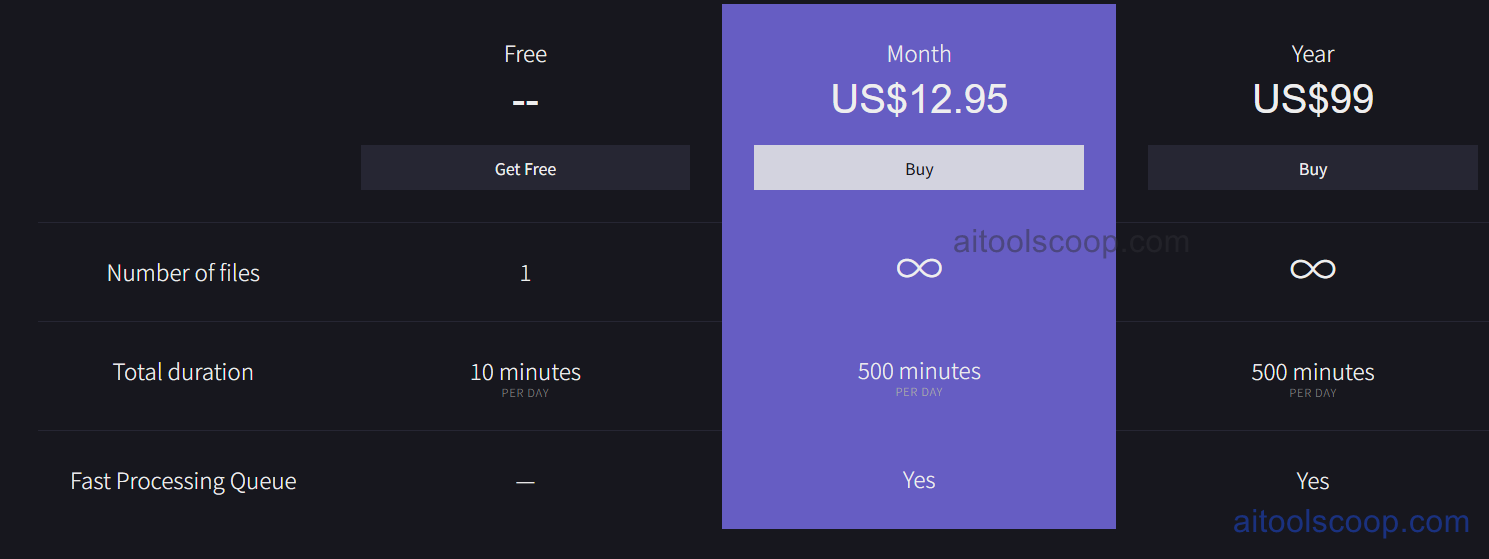
- Free — $0 — 1 file per day, 10 minutes total duration per day, no fast processing queue. No registration or software installation required. No time limit.
- Month — $12.95/month — Unlimited files per day, 500 minutes total duration per day, fast processing queue access.
- Year — $99/year (approximately $8.25/month effective rate) — Same features as the monthly plan: unlimited files per day, 500 minutes per day, fast processing queue. Significant saving versus twelve months of monthly billing.
Free plan available with no registration and no time limit. Annual billing saves approximately 36% compared to twelve months of monthly payments. Always verify current rates at vocalremover.org.
Who Should Use Vocal Remover?
Vocal Remover is designed for casual users who need a quick, no-commitment vocal stripping tool without setting up accounts, downloading software, or learning complex audio editing interfaces. It is well-suited to content creators who need instrumental versions of tracks for video backgrounds, karaoke performers who want to remove a lead vocal from any song, students and educators using music for academic purposes, and anyone who occasionally needs to separate a track without investing in a full-featured audio production platform. The free plan's one-file-per-day limit is sufficient for casual personal use. The paid plans serve users with higher-volume needs — for example, a karaoke DJ or a content creator working through a backlog of tracks. Users requiring multi-stem separation (isolating drums, bass, guitar individually) or professional-grade output should evaluate more comprehensive stem separation platforms.
Frequently Asked Questions
What is Vocal Remover?
Vocal Remover is a browser-based AI service that separates the vocal track from the instrumental backing in an uploaded audio file, producing downloadable vocal and instrumental stems. A permanently free plan processes one file per day up to 10 minutes with no registration required. Paid plans unlock unlimited daily file submissions, 500 minutes per day, and fast processing queue priority.
Is Vocal Remover free?
Yes. Vocal Remover offers a permanently free plan that processes one audio file per day up to 10 minutes of total audio duration, with no registration, no account creation, and no software installation required. Paid plans starting at $12.95/month remove these daily limits and add fast processing queue access.
Do I need to create an account to use Vocal Remover?
No. The free plan on Vocal Remover is accessible immediately without creating an account or providing any personal information. Users simply navigate to the website, upload a file, and download the separated tracks. Account creation may be required for paid subscription management.
What is the Fast Processing Queue?
The Fast Processing Queue is a paid subscriber benefit that moves a user's submitted audio files to the front of the processing line, ahead of standard-queue free users. During periods of high server demand, free users may experience longer wait times while paid subscribers receive near-immediate processing. Fast queue access is available on both the monthly and annual paid plans.
Can Vocal Remover separate multiple stems beyond vocals and instrumental?
Vocal Remover's primary function is separating the vocal layer from the full instrumental backing track, producing two output stems. It is not designed as a multi-stem isolation tool for separating individual instruments such as drums, bass, guitar, and piano independently. Users requiring multi-stem separation should evaluate dedicated stem separation platforms that offer individual instrument track isolation.