

Topaz Labs (topazlabs.com) is a professional-grade AI-powered image and video enhancement platform specializing in upscaling, denoising, sharpening, and quality restoration. With over two decades of photo enhancement technology development, Topaz Labs offers a comprehensive suite of desktop applications including Topaz Photo AI, Topaz Video AI, Topaz Gigapixel AI, and the all-in-one Topaz Studio. The platform uses advanced deep learning models trained on millions of images to achieve up to 16x image upscaling, intelligent noise elimination, detail enhancement, motion blur correction, video stabilization, and legacy content restoration to 4K quality. Topaz Labs targets professional photographers, videographers, 3D creators, AI artists, and content production teams who need desktop-based, privacy-focused enhancement tools that run locally or via cloud rendering.
How Topaz Labs Works
Topaz Labs operates as a suite of specialized desktop applications for Mac and Windows. Topaz Photo AI combines 11 AI-powered tools for sharpening, denoising, upscaling, face enhancement, and lighting correction, with an Autopilot feature that automatically applies optimal adjustments. Topaz Video AI restores and upscales videos to 4K, adds frame interpolation for slow-motion effects (up to 16x FPS), stabilizes shaky footage, and converts SDR to HDR. Topaz Gigapixel AI specializes in extreme upscaling (up to 6x for printing and large-format display). Topaz Studio bundles all apps with unlimited cloud rendering for maximum performance. The platform offers both local processing (files never leave your computer, ideal for confidential work) and cloud rendering (faster processing with latest models). All apps integrate as standalone software or plugins for Adobe Photoshop, Lightroom, Premiere Pro, and other professional creative tools. Users can batch process images, work with RAW files, and export in multiple formats.
Key Features
- Up to 16x image upscaling — enlarge low-resolution images to print-quality or ultra-high-res without losing detail
- AI noise reduction — remove grain and artifacts from high-ISO photos and low-light videos
- Detail sharpening — correct motion blur, soft focus, and lens imperfections using AI models
- Face enhancement — specialized AI for improving facial details, skin texture, and portrait quality
- Video upscaling to 4K — restore old footage and genAI videos to pristine 4K quality
- Frame interpolation — generate new frames for ultra slow-motion effects (up to 16x slower)
- Video stabilization — remove camera shake and smooth handheld footage in post-production
- SDR to HDR conversion — add brightness, dynamic range, and color depth to standard videos
- Project Starlight — cutting-edge models for high-accuracy 4K enhancement across video types
- Autopilot mode — AI automatically detects issues and applies optimal fixes for beginners
- Local & cloud processing — choose between private local rendering or fast cloud rendering
- Professional integrations — works as plugin for Photoshop, Lightroom, Premiere Pro, Capture One
- Batch processing — apply enhancements to hundreds of images or video clips simultaneously
- RAW file support — process RAW images directly without pre-conversion
- Unlimited cloud credits (Studio) — all-you-can-render cloud processing on Studio plans
- Commercial licensing — all plans include rights for professional and commercial use
Topaz Labs Pricing
- Individual Apps — One-time purchase or subscription
- Topaz Photo AI — $199/year or $17/month — 11 AI tools for photo enhancement, local & cloud rendering
- Topaz Video AI — $299/year or $25/month — Video upscaling, stabilization, frame interpolation, SDR to HDR
- Topaz Gigapixel AI — $99/year or $8/month — Extreme upscaling up to 6x for printing and display
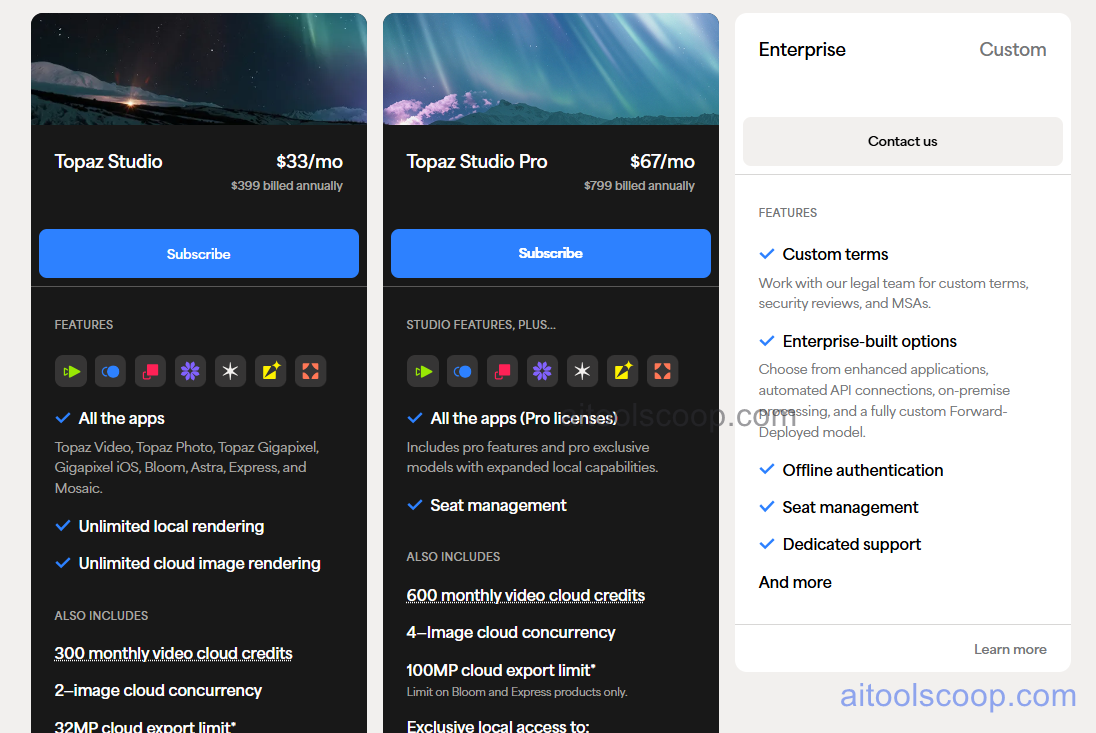
- Topaz Studio — $33/month ($396/year) — All apps (Photo, Video, Gigapixel, Bloom, Astra, Express, Mosaic), unlimited cloud image rendering, extra video cloud credits, all new apps on release, personal and commercial use for organizations under $1M revenue.
- Topaz Pro — $67/month — Studio features plus Pro-exclusive models, expanded local capabilities, priority support, advanced customization.
- Enterprise Plans — Custom pricing — Contact sales for AI enhancement built for enterprise workflows, production pipelines, and team collaboration.
Monthly credits (video cloud) expire at the end of each month and do not roll over. Always check the latest rates on the official website. For more AI tool reviews, visit aitoolscoop.com.
Who Should Use Topaz Labs?
Topaz Labs is ideal for professional photographers who shoot in challenging conditions (low light, high ISO, motion blur) and need AI-powered noise reduction, sharpening, and upscaling to salvage otherwise unusable shots. Wedding and event photographers rely on Topaz Photo AI to rescue underexposed or blurry images from critical moments. Commercial photographers and product shooters use Gigapixel AI to upscale images for large-format printing, billboards, and high-resolution web galleries. Videographers and filmmakers leverage Topaz Video AI to restore old footage, stabilize handheld shots, add slow-motion effects, and upscale genAI videos to broadcast-quality 4K. 3D artists and AI creators use the platform to enhance rendered scenes and AI-generated images (Midjourney, Stable Diffusion) for final polishing. The desktop-first architecture and local processing appeal to professionals handling confidential client work, proprietary content, or anyone prioritizing data privacy over cloud-only tools. Topaz Studio is best for active professionals who need the entire suite with unlimited cloud rendering, while individual app purchases suit specialists focusing on photo-only or video-only workflows. The platform requires moderate-to-high hardware (GPU, RAM) for optimal local performance, making it less suitable for users with older computers or those preferring lightweight browser-based tools.