
Best Free Open-Source AI Image Upscaler
Upscayl (upscayl.org) is a free and open-source AI image upscaler that processes images entirely on your local machine using Real-ESRGAN neural network models with Vulkan GPU acceleration. Unlike cloud-based competitors that charge per image or subscription, Upscayl is completely free with no watermarks, no usage limits, and no internet requirement — download once, use forever. With over 44,000 GitHub stars and features in Digital Trends and How-To Geek, Upscayl has become the gold standard for privacy-conscious creators who need professional upscaling without recurring costs. The desktop application runs on Windows 10+, macOS 12+, and Linux, offering up to 16x enlargement through double upscaling passes.
How Upscayl Works
Download and install Upscayl for your operating system (requires a Vulkan-compatible GPU for hardware acceleration). Launch the application and upload a single image or enable Batch Upscale mode to select an entire folder. Choose from six default AI models: General Photo (Real-ESRGAN) for all-purpose use, UltraSharp for maximum detail, Remacri for balanced enhancement, Ultramix Balanced for mixed content, High Fidelity (HFA2k) for artwork and illustrations, or Digital Art for anime and vector-style images. Set the scale factor (2x, 3x, or 4x per pass) — enable Double Upscayl to chain two passes together for up to 16x total enlargement. Select output format (PNG for lossless quality or JPEG for smaller files) and destination folder, then click Upscayl to start processing. All computation happens locally on your GPU via Vulkan, ensuring complete privacy with no cloud uploads.
Key Features
- Free and open-source — completely free with AGPL-3.0 license, no watermarks, no usage limits, no subscriptions
- Local processing — runs entirely on your computer with Vulkan GPU acceleration, ensuring 100% data privacy
- Six AI models — General Photo, UltraSharp, Remacri, Ultramix Balanced, High Fidelity, and Digital Art for different content types
- Up to 16x upscaling — chain two 4x passes together with Double Upscayl feature for extreme enlargement
- Batch processing — upload entire folders and process hundreds of images with identical settings
- Custom model support — integrate your own trained AI models for specialized upscaling needs
- Cross-platform — native applications for Windows, macOS, and Linux with consistent interface
- Before/after comparison — built-in slider to evaluate upscaling results instantly
- No internet required — works completely offline after installation
- Upscayl Cloud option — faster cloud-based processing starting at ~$12/month for users without capable GPUs
Upscayl Pricing
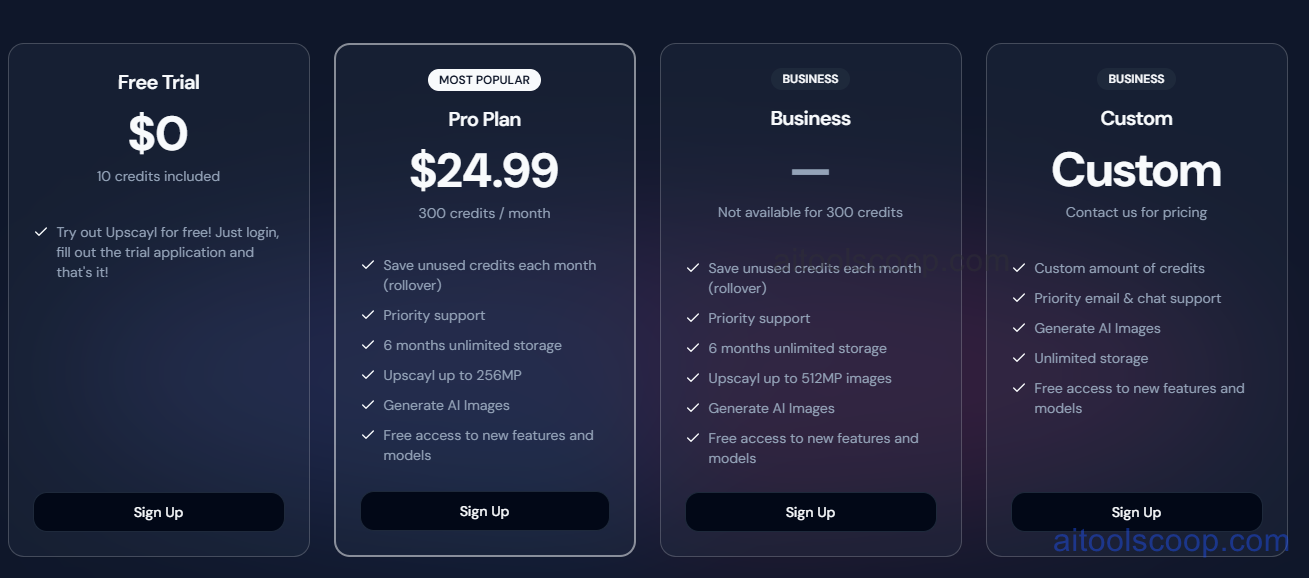
- Desktop (Free) — $0 forever — download once and use indefinitely with no limitations, all AI models, batch processing, up to 16x upscaling, completely offline, no watermarks, open-source AGPL-3.0 license.
- Upscayl Cloud — ~$24/month or ~$219.99/year — faster cloud-based processing for users without capable GPUs, 12+ AI models, unlimited storage, mobile access, priority processing.
- Enterprise — Custom pricing — volume licensing for studios and agencies, API access, dedicated support.
Always check the latest rates on the official website. For more AI tool reviews, visit aitoolscoop.com.
Who Should Use Upscayl?
Upscayl is perfect for privacy-conscious users who refuse to upload personal or sensitive images to cloud servers, budget-conscious creators who need professional upscaling without recurring subscription costs, illustrators and digital artists working with line art, anime frames, or game screenshots, photographers who own capable GPUs and prefer local processing control, Linux users seeking native open-source tools for their workflows, and anyone who values software freedom and transparency. The desktop version is ideal if you have a Vulkan-compatible GPU (NVIDIA, AMD, or Intel Arc) — processing is fast, completely private, and free forever. Users with integrated graphics or older hardware can opt for Upscayl Cloud at $24/month, still cheaper than competitors while supporting the open-source project.