

Plerdy (plerdy.com) is a conversion rate optimisation (CRO) and user experience analytics platform that consolidates multiple website analysis tools into a single lightweight script. Founded in 2018 and headquartered in Ukraine, Plerdy is used by marketers, UX designers, SEO professionals, and e-commerce teams to understand how visitors interact with their websites and identify friction points that prevent conversions. The platform covers heatmaps, click maps, session recordings, form analytics, a real-time SEO checker, event tracking, and pop-up builder — all accessible from one dashboard.
Plerdy's AI capabilities include an AI UX assistant that analyses recorded user sessions and heatmap data to automatically identify usability problems, highlight high-drop-off areas, and suggest specific optimisation recommendations — reducing the time analysts spend manually reviewing session recordings. The platform's real-time SEO checker runs automatically on every page of the website and surfaces on-page SEO issues including missing meta tags, duplicate titles, broken heading structures, and image alt text problems, making it a useful passive SEO monitoring tool alongside its behavioural analytics features.
How Plerdy Works
Website owners install Plerdy by adding a single JavaScript snippet to their site — compatible with any CMS including WordPress, Shopify, and Wix. Once installed, Plerdy begins recording visitor click data (for heatmaps), session replays (video recordings of individual user journeys), and form interaction data automatically. The SEO checker simultaneously audits every page for on-page issues. Marketers view heatmaps and session recordings in the Plerdy dashboard, use the AI assistant to get automated analysis of behavioural patterns, and deploy pop-up forms for lead capture or survey research. No additional configuration is required to begin collecting data after installation.
Key Features
- AI UX assistant — analyses heatmap and session recording data automatically to identify usability issues and suggest optimisation actions
- Heatmaps and click maps — visual overlays showing where visitors click, scroll, and hover on every page of the website
- Session recordings — video replays of individual user sessions showing exactly how visitors navigate and interact with the site
- Real-time SEO checker — passive on-page SEO audit running on every page, flagging missing tags, duplicate titles, heading issues, and alt text problems
- Form analytics — tracks field-by-field interaction with forms to identify where users drop off or struggle during form completion
- Pop-up and lead capture builder — create and deploy pop-up forms, surveys, and feedback widgets without a separate tool
- E-commerce funnel analytics — track and visualise the conversion funnel for product pages, cart, and checkout on e-commerce sites
- Event tracking — automatically captures clicks on buttons, links, and interactive elements without manual event tagging
- NPS and feedback surveys — collect net promoter score and qualitative feedback directly from visitors on the site
- Shopify and WordPress compatible — single script installation works across all major CMS and e-commerce platforms
Plerdy Pricing
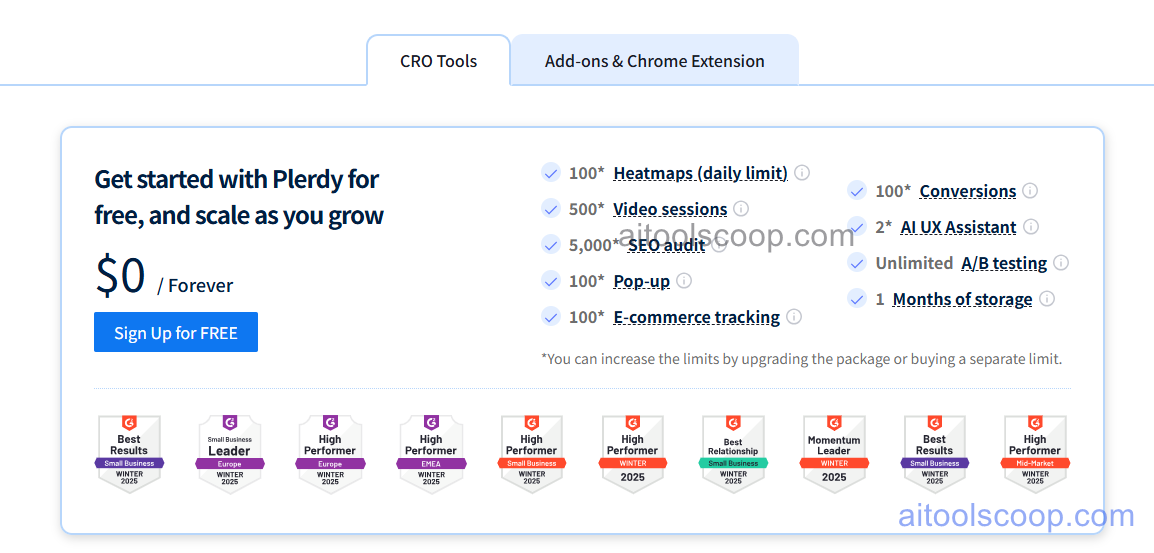
Plerdy offers a permanently free plan alongside paid plans for higher data volumes and advanced features.
- Free — heatmaps, session recordings (limited), SEO checker, form analytics, and pop-up builder with monthly data limits. No credit card required. Suitable for small websites and solo marketers evaluating CRO analytics.
- Paid plans — higher session recording limits, more heatmap data, AI UX assistant access, e-commerce funnel analytics, and priority support. Pricing scales with data volume and features — check plerdy.com/pricing for current plan details.
The free plan is permanently available with no credit card required. Always verify current rates at plerdy.com/pricing.
Who Should Use Plerdy?
Plerdy is well suited to marketers, UX designers, SEO professionals, and e-commerce teams who want a consolidated behavioural analytics and CRO tool without paying for multiple separate platforms. Its free plan is genuinely functional for small websites and early-stage businesses evaluating their user experience. The real-time SEO checker is a valuable passive audit tool for site owners who want continuous on-page SEO monitoring without running manual audits. Plerdy is less suited to enterprise teams that need advanced A/B testing, deep funnel customisation, or integration with enterprise data warehouses — tools like Hotjar Enterprise or FullStory are more appropriate for those use cases.
Frequently Asked Questions
Is Plerdy free to use?
Yes. Plerdy offers a permanently free plan that includes heatmaps, session recordings, the SEO checker, form analytics, and the pop-up builder with monthly data limits. No credit card is required to sign up. The free plan is suitable for small websites and solo marketers who want to start collecting behavioural data and on-page SEO insights without a paid subscription.
What is Plerdy used for?
Plerdy is a CRO and UX analytics platform used to understand how visitors behave on a website and identify opportunities to improve conversion rates. It combines heatmaps, session recordings, form analytics, SEO auditing, and pop-up forms in a single tool — reducing the need to run multiple separate analytics platforms simultaneously. Marketers use it to find high-drop-off pages, UX friction points, and on-page SEO issues that affect both user experience and search rankings.
How does Plerdy compare to Hotjar?
Both Plerdy and Hotjar offer heatmaps, session recordings, and feedback tools. Plerdy's key differentiators are its built-in real-time SEO checker and AI UX assistant — features Hotjar does not include. Hotjar has a larger user base, more established integrations, and a slightly more polished interface for session replay analysis. Plerdy's free plan is competitive with Hotjar's free tier for small sites. Teams that need SEO auditing alongside behavioural analytics in one tool often prefer Plerdy; teams focused purely on UX research often find Hotjar's session replay tools more refined.
Does Plerdy work with Shopify and WordPress?
Yes. Plerdy installs via a single JavaScript snippet that is compatible with any website platform including WordPress, Shopify, Wix, Squarespace, and custom-built sites. Dedicated Shopify and WordPress plugins are available to simplify installation. Once installed, Plerdy begins collecting heatmap, session recording, and SEO data automatically without additional configuration for each page.
What does the Plerdy SEO checker do?
Plerdy's real-time SEO checker runs passively on every page of the website as visitors browse, collecting on-page SEO data without requiring a manual crawl trigger. It flags issues including missing or duplicate meta titles and descriptions, broken heading tag hierarchies (H1, H2 structure), missing image alt text, and other on-page elements that affect search engine indexing. The SEO checker dashboard shows a page-by-page breakdown of detected issues for prioritised fixing.