
Pixlr (pixlr.com) is a veteran browser-based photo editing platform that has evolved from a simple online editor into a comprehensive AI-powered creative suite. Originally launched in 2008 and later acquired by the Inmagine Group (parent company of 123RF), Pixlr now offers two distinct editors: Pixlr X for quick, simplified editing and Pixlr E for advanced, layer-based work with Photoshop-level complexity. What sets Pixlr apart in 2026 is its combination of professional editing capabilities with genuinely useful free-tier access — including AI background removal with no watermarks, making it one of the best free AI photo editors available.
How Pixlr Works
Access Pixlr directly in your browser without installation, or download the mobile app for iOS and Android. Choose between Pixlr X for fast, template-driven edits or Pixlr E for full control with layers, masks, and advanced adjustments. Upload an image and the AI auto-enhance instantly improves exposure, contrast, and colors with one click. For background removal, the AI accurately detects subjects and removes backgrounds without watermarks even on the free plan. Generative Fill allows you to select an area and describe what you want to appear there — similar to Photoshop's feature but in the browser. The platform offers thousands of customizable templates for social media, batch editing for processing multiple images simultaneously, and integrates with tools like Figma and Photoshop for professional workflows.
Key Features
- Dual editor system — Pixlr X for quick edits and templates, Pixlr E for professional layer-based editing with Photoshop-like tools
- AI background remover — instant, accurate background removal with no watermarks even on the free plan, handles complex edges and hair
- Generative Fill — AI-powered content-aware fill to add or remove objects by describing what you want
- Auto enhance — one-click AI that automatically improves exposure, contrast, and color balance
- Professional editing tools — layers, masks, blend modes, curves, levels, HSL adjustments, and text styling
- Batch editing — process multiple images simultaneously with watermarks, resizes, or filters (Premium only)
- Thousands of templates — pre-designed layouts for social media posts, banners, and marketing materials
- AI image upscaler — enhance resolution and sharpen details using AI super-resolution technology
- Cross-platform availability — works in browsers, iOS, Android, with synchronized projects across devices
- Integration-friendly — plugins for Figma, Photoshop, and API access for developers
Pixlr Pricing
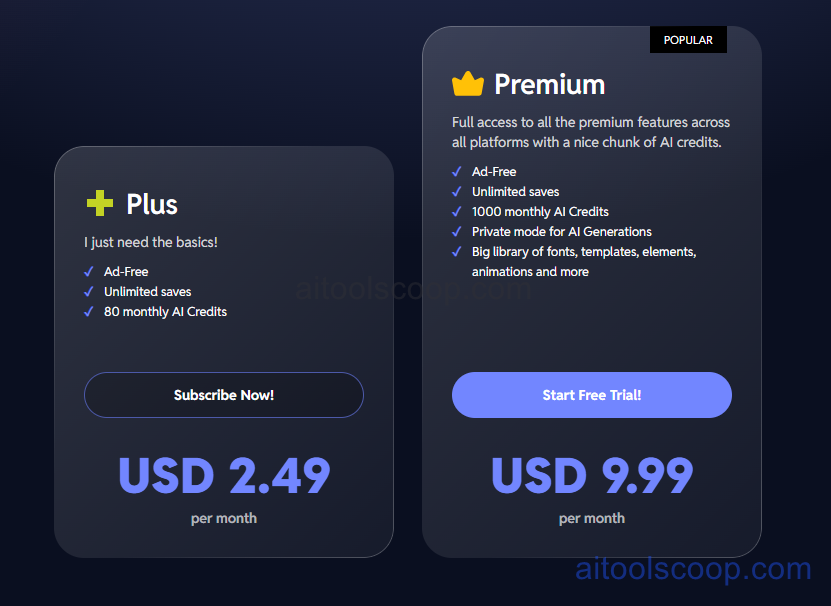
- Free — $0/month — core editing tools, AI background remover without watermarks, auto enhance, basic templates, limited batch editing, ads in editor, 10MB file size limit, 5 image saves per day.
- Plus — $2.49/month or $1.49/month billed annually — ad-free editing, unlimited saves, batch processing, premium templates, priority AI processing, increased file size limits, commercial license.
- Premium — $9.99/month or $6.49/month billed annually — everything in Plus, advanced AI tools including Generative Fill, unlimited batch editing, premium fonts and design assets, priority customer support, team features.
Always check the latest rates on the official website. For more AI tool reviews, visit aitoolscoop.com.
Who Should Use Pixlr?
Pixlr is perfect for budget-conscious users who need Photoshop-level editing without paying Adobe's subscription, students and educators seeking free professional-grade tools for design classes, small business owners creating marketing materials without hiring designers, social media managers who need quick template-based edits and batch processing, and anyone who works across multiple devices and wants browser-based accessibility. The genuinely functional free tier makes it ideal for casual users who occasionally need to remove backgrounds or enhance photos, while the affordable Plus plan at $1.49/month annually is hard to beat for removing ads and unlocking unlimited saves. Pixlr strikes the sweet spot between Canva's simplicity and Photoshop's power, delivered at a fraction of Adobe's cost.