PicsArt (picsart.com) is a comprehensive AI-powered creative platform serving over 150 million monthly users worldwide. Originally launched as a mobile-first photo editor, PicsArt has evolved into an end-to-end creative engine combining AI image generation, professional photo and video editing, design templates, and collaboration features in a single ecosystem. The platform operates across web, iOS, Android, Windows, and Mac, with cloud synchronization enabling seamless work across devices. PicsArt is positioning itself as the creative equivalent of Google Workspace — not necessarily the best at any single task, but the most effective at connecting all creative tasks together into one unified workflow.
How PicsArt Works
Upload an image or start from scratch, and access PicsArt's suite of AI-powered tools through an intuitive interface. The AI background remover instantly detects and removes backgrounds in seconds, handling complex edges like hair with advanced segmentation. For generation, describe what you want and the text-to-image AI creates original visuals using multiple generative models. The platform offers thousands of templates sized for every social media platform — Instagram, TikTok, Facebook, LinkedIn — with effects and filters that update weekly to match trending aesthetics. Advanced users can leverage layer-based composition with blend modes, masks, and professional color correction tools. The newly introduced Aura AI agent understands natural language commands, allowing you to edit by conversation: "make this brighter and remove the background" executes multiple edits automatically without clicking through menus.
Key Features
- AI background removal — instant subject detection and background removal with accurate edge handling for hair, transparency, and complex details
- Text-to-image generation — create original images from text descriptions using multiple AI models including the latest generation engines
- Aura AI agent — conversational AI assistant that executes multi-step edits from natural language commands like "resize for Instagram and add vintage filter"
- AI agent marketplace — hire specialized AI agents for specific tasks like Resize Pro for platform-specific formatting, Remix for style transfers, Swap for background changes, and Flair for e-commerce optimization
- Video editing with AI — AI-powered video background removal, enhancement, effects, and text-to-video generation for short-form social content
- 100,000+ templates and design resources — professionally designed templates for social posts, stories, reels, carousels, business cards, and marketing materials
- Layer-based composition — professional editing with layers, blend modes, masks, and advanced adjustment tools rivaling desktop software
- Batch editing and automation — process multiple images or videos with identical edits, or chain AI tools into automated workflows
- Team collaboration — shared workspaces, comments, feedback, and version control for agencies and creative teams
- API and SDK access — integrate PicsArt's AI tools into custom applications with flexible APIs for enterprises and developers
PicsArt Pricing
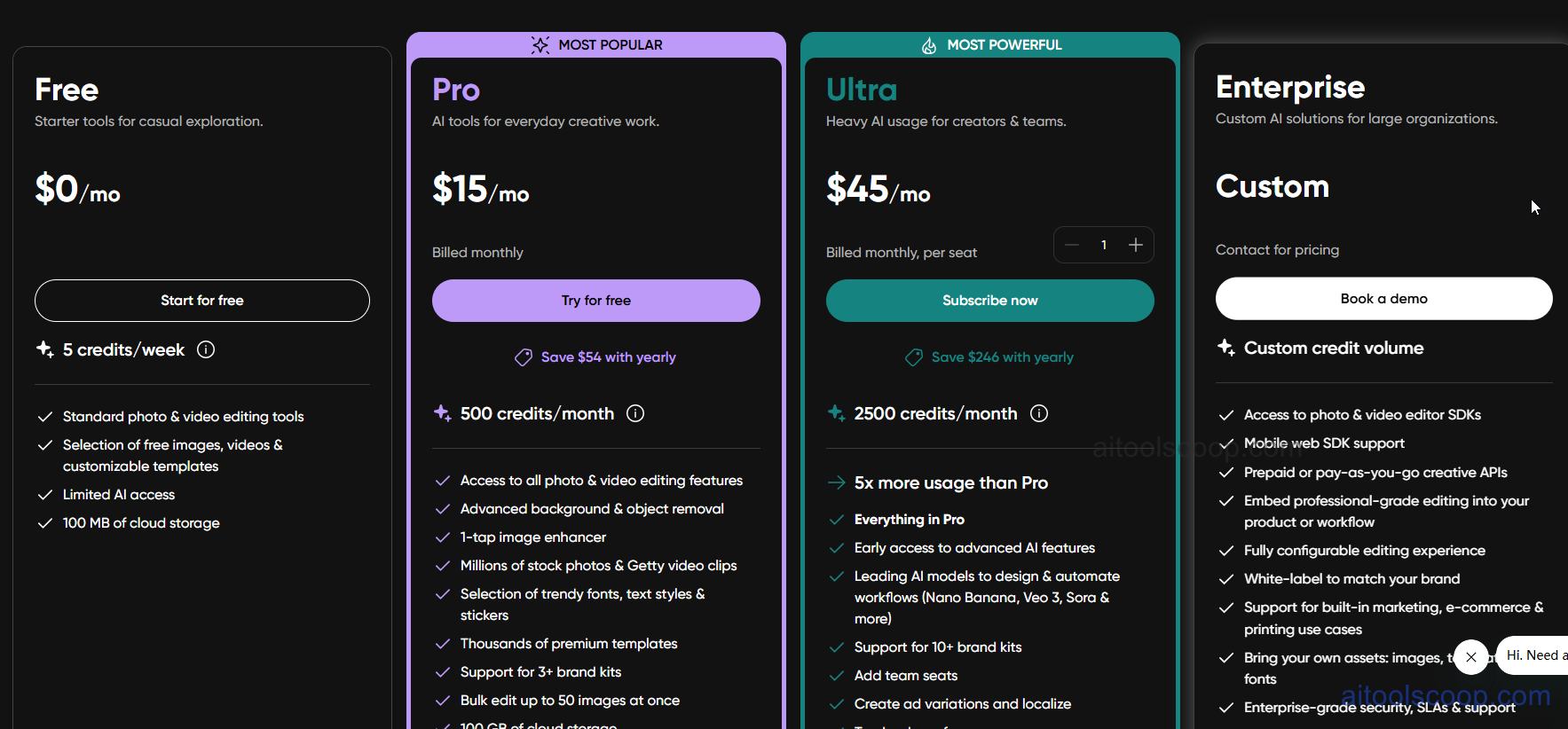
- Free — $0/month — basic photo and video editor, limited AI features, 5 free AI credits weekly, templates and design assets, 100MB cloud storage, ads present.
- Plus — $15/month or $10.50/month billed annually — ad-free experience, unlimited photo and video editing, AI background removal and enhancement, access to premium templates and stock photos, expanded AI credits, priority processing.
- Pro — $45/month or $24.50/month billed annually — everything in Plus, advanced AI tools including agent marketplace access, team collaboration with 3+ seats, 4x more cloud storage, commercial license for AI-generated content, API access.
- Enterprise — Custom pricing — custom solutions for large organizations with dedicated account management, white-labeling options, advanced SDK and API access, enterprise-grade security, unlimited team members, custom feature development.
Always check the latest rates on the official website. For more AI tool reviews, visit aitoolscoop.com.
Who Should Use PicsArt?
PicsArt is ideal for social media managers creating daily content across multiple platforms, content creators producing graphics and videos for Instagram, TikTok, and YouTube, small businesses and solopreneurs needing design tools without hiring designers, e-commerce sellers requiring product photo editing and mockups, marketing teams collaborating on visual campaigns, and Gen Z creators who grew up with mobile-first creative tools. The platform's strength lies in its ability to replace multiple specialized tools with one integrated ecosystem — you can ideate, generate, edit, compose, format, and publish without ever leaving PicsArt. For teams managing 50+ social posts weekly or creators producing multiple pieces of content daily, the time saved by workflow integration justifies the subscription cost.