

Home/ AI Tools /AI Writing Tools /Hemingway Editor
Hemingway Editor Freemium
🤖 AI Writing Tools
#11 in AI Writing Tools

Hemingway Editor

Hemingway Editor is a readability and clarity tool that color-codes complex sentences, passive voice, and adverbs to help writers produce bold, clear prose. Free web version. Plus plans from $10/month.

4.2 / 5 Freemium From $10/mo
Quick Info
💰 Pricing$10/mo
⭐ Rating4.2 / 5
🆓 Free Plan✅ Yes
📂 CategoryAI Writing Tools
🌐 WebsiteVisit ↗
🕐 Last UpdatedApr 8, 2026
🔀 Alternatives25 tools
Verified Data Updated Apr 8, 2026
Independently Reviewed No paid placements
Detailed Analysis Hands-on testing
Key Features
  • Five-color readability highlighting flags hard sentences, passive voice, adverbs, and complex phrases
  • Readability grade level rated using Automated Readability Index
  • Write mode for distraction-free drafting and Edit mode for full analysis
  • Feedback mode evaluates structure, logic, flow, clarity, and tone
  • AI rewriting on Plus plans for instant one-click sentence rewrites
  • Eight writing style toggles including confident, formal, friendly, and casual
  • Advanced grammar correction beyond basic spell-check on Plus plans
  • WordPress and Medium direct publishing integration
4.2
Overall Rating
Ease of Use
4.4
Features
4.2
Value
3.9
Performance
4.3
Support
4.1
Pros & Cons
👍 Pros
  • Free web version includes all core readability features with no account required
  • No-account instant access — paste and analyze immediately without signing up
  • Readability grade level is uniquely useful for writing to specific audience levels
  • Five-color visual system makes problem areas immediately obvious at a glance
  • Desktop app available as a one-time $19.99 purchase for offline work
👎 Cons
  • Plus AI rewriting priced per credit — $10-15/month for limited rewrites is poor value vs ChatGPT
  • AI features require internet connection even on the paid desktop app
  • Rigid approach to prose can strip out distinctive voice in literary or creative writing
  • No grammar checker in the free version — requires Plus for advanced grammar
  • AI feedback can feel generic and lacks the depth of tools like ProWritingAid
📖

About Hemingway Editor

Hemingway Editor (hemingwayapp.com) is a writing clarity and readability tool named after Ernest Hemingway's famously direct prose style. It analyzes text and uses a five-color highlighting system to flag potential issues — hard-to-read sentences, very hard-to-read sentences, passive voice, adverbs, and complex phrases — giving writers an immediate visual picture of where their writing is dense or unclear. The free web version includes all core readability features; the paid Hemingway Editor Plus adds AI-powered rewriting and feedback.

How Hemingway Editor Works

You paste or write text in the Hemingway web editor. The tool immediately highlights five categories of potential issues in different colors: yellow for hard-to-read sentences, red for very hard-to-read sentences, green for passive voice, blue for adverbs, and purple for complex phrases with simpler alternatives. The right sidebar shows your readability grade level, word count, reading time, and counts for each issue type. Hemingway Editor Plus adds AI rewriting suggestions with one-click application and a Feedback mode that evaluates structure, logic, flow, and tone.

Key Features

  • Five-color readability highlighting — instantly flags hard sentences, passive voice, adverbs, and complex phrases
  • Readability grade level — rates text accessibility using the Automated Readability Index
  • Write and Edit modes — distraction-free writing mode and full analysis editing mode
  • Feedback mode — evaluates structure, logic, flow, clarity, and tone for big-picture improvements
  • AI rewriting (Plus) — instant suggestions to rewrite wordy sentences and passive voice with one click
  • Eight writing styles (Plus) — apply confident, formal, friendly, casual, or other tones via AI
  • Grammar tool (Plus) — advanced grammar correction beyond basic spell-check
  • WordPress and Medium integration — publish directly from the Hemingway editor

Hemingway Editor Pricing
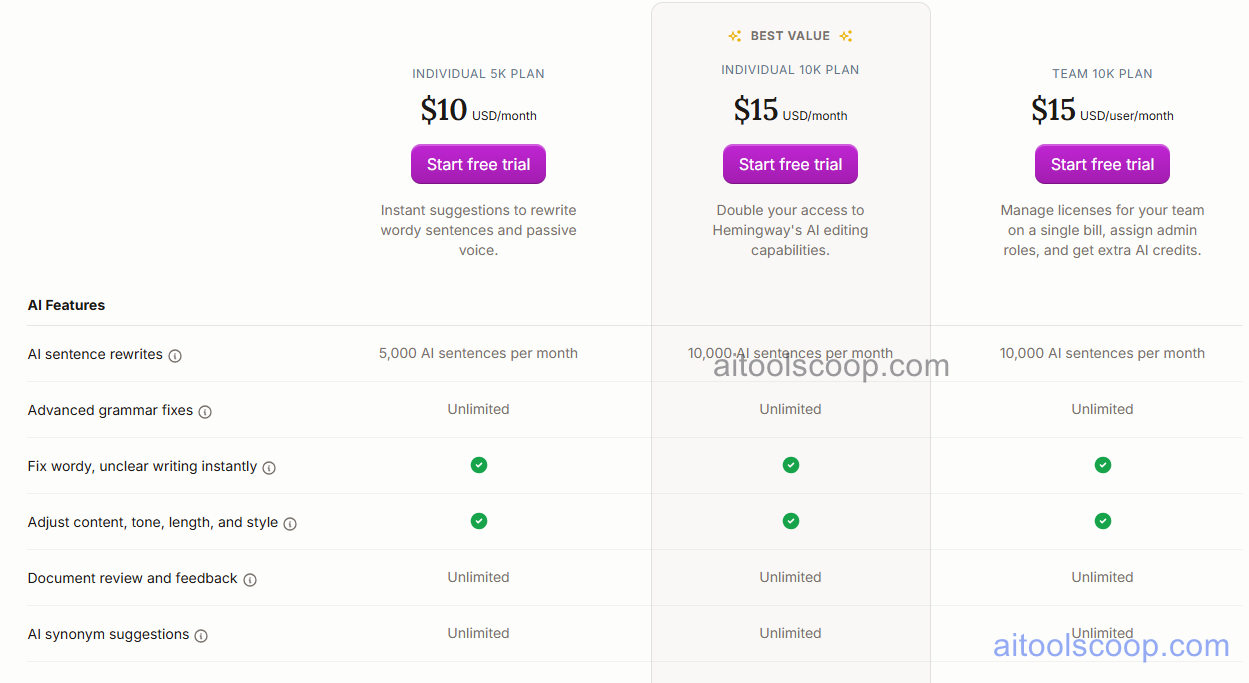
Hemingway Editor pricing plans
Hemingway Editor pricing — screenshot from hemingwayapp.com
  • Free — $0 — full readability highlighting, grade level, word count, and all five color categories. Available at hemingwayapp.com with no account required.
  • Plus Individual 5K — $10/month — 5,000 AI sentence rewrites, AI grammar tool, eight writing styles, Feedback mode. Annual plan at $8.33/month.
  • Plus Individual 10K — $15/month — 10,000 AI sentence rewrites, everything in 5K plan. Annual plan at $12.50/month.

Desktop App: A separate one-time purchase of $19.99 for Mac and Windows provides offline access to all free features without AI capabilities.

Always check the latest rates on the official website. For more AI tool reviews, visit aitoolscoop.com.

Who Should Use Hemingway Editor?

Hemingway Editor is built for bloggers, journalists, business writers, and content marketers who need to ensure their writing is clear, concise, and accessible to a broad audience. The free web version is genuinely powerful for readability analysis and requires no account. Fiction writers and literary authors should be aware that Hemingway's rigid approach to prose may smooth out distinctive voice — it is designed for clear communication rather than artistic style.


💰

Pricing Plans

Plan Price Includes
Pro $10/mo Full access + priority support
Check Current Pricing →
Affiliate Disclosure: This page contains affiliate links. If you click and make a purchase, we may earn a small commission at no extra cost to you. We only recommend tools we genuinely believe in.

🎯 Explore More

Discover other curated resources from our platform

🛠️ AI Tools View All →
Replit
Replit
★ 4.2
Kimi
Kimi
★ 4.1
Superhuman
Superhuman
★ 4.3
⚔️ VS Comparisons View All →
ChatGPT vs Kimi: 2026 Comparison — Pricing, Features & Verdict
ChatGPT vs Kimi: 2026 Comparison —…
ChatGPT vs Kimi
⚔️
ChatGPT vs Gemini for Writing in…
ChatGPT GPT-4o vs Gemini 1.5 Pro
ChatGPT vs Claude: 2026 Comparison — Pricing, Features & Verdict
ChatGPT vs Claude: 2026 Comparison —…
ChatGPT vs Claude
💡 Free Prompts View All →
💡
AI Prompt to Create a Complete…
🔥 14.3K uses
💡
How Freelancers Can Use Claude to…
🔥 8.3K uses
💡
The Healthcare QA Engineer's Intermediate Playbook…
🔥 11.4K uses
💡 Free Prompts