

Home/ AI Tools /AI Coding Tools /GitHub Copilot
GitHub Copilot Freemium
🤖 AI Coding Tools
#2 in AI Coding Tools

GitHub Copilot

GitHub Copilot is an AI coding assistant built into your IDE. It offers inline code suggestions, chat, agent mode, and multi-model support. Free plan available. Pro from $10/month.

4.6 / 5 Freemium From $10/mo
Quick Info
💰 Pricing$10/mo
⭐ Rating4.6 / 5
🆓 Free Plan✅ Yes
📂 CategoryAI Coding Tools
🌐 WebsiteVisit ↗
🕐 Last UpdatedApr 5, 2026
🔀 Alternatives10 tools
Verified Data Updated Apr 5, 2026
Independently Reviewed No paid placements
Detailed Analysis Hands-on testing
Key Features
  • Inline code suggestions — real-time autocomplete across all major languages in supported IDEs
  • Copilot Chat — conversational AI in IDEs, GitHub.com, and GitHub Mobile
  • Agent mode — autonomously plans, edits, tests, and validates across multiple files
  • Plan mode — generates a reviewable blueprint before any code is written
  • Multi-model support — choose from OpenAI, Claude, and Gemini models on eligible plans
  • Copilot CLI — AI assistance in the terminal for shell commands and workflows
  • Next edit suggestions — predicts your next likely code change before you make it
  • Code review assistance — AI-generated pull request summaries and inline review suggestions
4.6
Overall Rating
Ease of Use
4.8
Features
4.6
Value
4.3
Performance
4.7
Support
4.5
Pros & Cons
👍 Pros
  • Free plan includes 2,000 completions and chat — generous for casual use
  • Deep IDE integration across VS Code, JetBrains, Visual Studio, Xcode, Eclipse, and more
  • Agent and plan mode enable autonomous multi-file coding tasks
  • Multi-model flexibility — switch between OpenAI, Claude, and Gemini on Pro and above
  • Free access for verified students and qualifying open-source maintainers
  • Backed by GitHub and Microsoft — continuous updates and enterprise-grade reliability
👎 Cons
  • Premium requests are capped per month — heavy users may exhaust allowances quickly
  • Pro+ at $39/month is expensive for individual developers
  • Business and Enterprise plans require separate GitHub subscription costs
  • Suggestions can be less reliable on complex logic or niche programming languages
  • Free plan does not include agent mode or CLI access
📖

About GitHub Copilot

GitHub Copilot (github.com/features/copilot) is an AI-powered coding assistant developed by GitHub and Microsoft. It integrates directly into popular IDEs — including VS Code, JetBrains, Visual Studio, Xcode, and Eclipse — delivering real-time inline code completions, multi-file edits, and an AI chat interface throughout the development workflow. Copilot supports a wide range of programming languages and is backed by models from OpenAI, Anthropic, and Google.

How GitHub Copilot Works

GitHub Copilot analyzes the context of your code — including open files, cursor position, comments, and project structure — and generates inline suggestions as you type. Beyond completions, Copilot Chat lets you ask questions, explain code, and request refactors in natural language. Agent mode and plan mode allow Copilot to autonomously analyze a codebase, create a step-by-step implementation plan, make edits across multiple files, run tests, and validate results — all from a single prompt.

Key Features

  • Inline code suggestions — real-time autocomplete across all major programming languages in supported IDEs
  • Copilot Chat — conversational AI interface available in IDEs, GitHub.com, and GitHub Mobile
  • Agent mode — autonomously plans, edits, tests, and validates code changes across multiple files
  • Plan mode — generates a reviewable implementation blueprint before any code is written
  • Multi-model support — choose from OpenAI, Claude (Anthropic), and Gemini (Google) models on eligible plans
  • Copilot CLI — AI assistance directly in the terminal for shell commands and workflows
  • Next edit suggestions — predicts and suggests your next likely code change before you make it
  • Code review assistance — AI-generated pull request summaries and inline review suggestions

GitHub Copilot Pricing
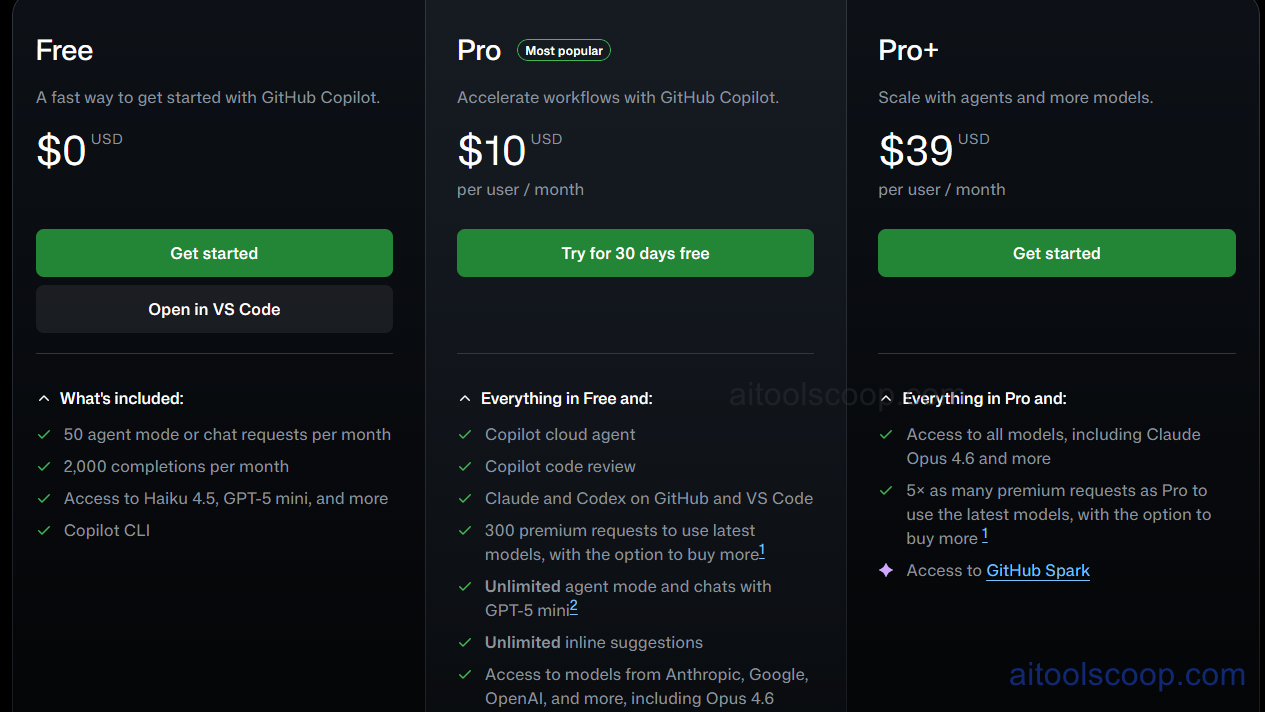
GitHub Copilot pricing plans
GitHub Copilot pricing — screenshot from github.com/features/copilot/plans
  • Free — $0/month — up to 2,000 inline suggestions and 50 premium requests per month; Copilot Chat included.
  • Pro — $10/month — unlimited completions, 300 premium requests/month, access to additional AI models, Copilot CLI, and agent mode. Billed annually at $100/year ($8.33/month).
  • Pro+ — $39/month — everything in Pro plus 1,500 premium requests/month, priority access to the latest and most capable models including Claude Opus 4 and OpenAI o3.

Business ($19/user/month) and Enterprise ($39/user/month) plans are also available for teams and organizations needing centralized management, policy controls, and audit logs.

Always check the latest rates on the official website. For more AI tool reviews, visit aitoolscoop.com.

Who Should Use GitHub Copilot?

GitHub Copilot is built for software developers at every level — from students learning to code to senior engineers shipping production software. The free tier is ideal for casual developers exploring AI assistance. Pro suits developers who code regularly and want unlimited completions with model flexibility. Pro+ is for power users who need maximum request capacity and access to the most advanced AI models. Verified students and qualifying open-source maintainers can access Pro features at no cost through GitHub Education.

💰

Pricing Plans

Plan Price Includes
Pro $10/mo Full access + priority support
Check Current Pricing →
Affiliate Disclosure: This page contains affiliate links. If you click and make a purchase, we may earn a small commission at no extra cost to you. We only recommend tools we genuinely believe in.

🎯 Explore More

Discover other curated resources from our platform

🛠️ AI Tools View All →
Warp
Warp
★ 4.3
Perplexity AI
Perplexity AI
★ 4.4
Leonardo.ai
Leonardo.ai
★ 4.4
⚔️ VS Comparisons View All →
ChatGPT vs Gemini: 2026 Comparison — Pricing, Features & Verdict
ChatGPT vs Gemini: 2026 Comparison —…
ChatGPT vs Gemini
ChatGPT vs Gemini: Which AI Writing Tool Wins in 2026?
ChatGPT vs Gemini: Which AI Writing…
⚔️
DeepSeek vs Gemini: Which AI Is…
DeepSeek R1 vs Google Gemini 2.0 Pro
💡 Free Prompts View All →
💡
Supplement Stack Planner for Any Health…
🔥 14.9K uses
💡
Prompts Not Capturing the Right Architectural…
🔥 4.8K uses
💡
Student Motivation Dropping Mid-Course Solved: Advanced…
🔥 7.4K uses
💡 Free Prompts