Best AP and AR Automation Tool for Small Businesses
BILL (bill.com) is a cloud-based financial operations platform that automates accounts payable (AP) and accounts receivable (AR) for small and mid-sized businesses. BILL uses AI to capture and extract data from incoming vendor bills, routes them through configurable approval workflows, and executes payments via ACH, check, wire transfer, or international payment. On the AR side, BILL sends branded invoices, accepts online payments, and auto-matches receipts to open invoices. Over 470,000 businesses rely on BILL for their financial operations.
How BILL Works
Connect BILL to your accounting software and bank account. Vendors email or upload invoices directly to your BILL inbox — AI captures the key fields automatically. Configure approval rules by amount, vendor, or department; approvers receive email or mobile notifications and can approve with one click. Once approved, BILL initiates payment and syncs the completed transaction back to your accounting system. For AR, create invoices in BILL or sync them from QuickBooks or Xero, send to customers, and collect via ACH or card — all reconciled automatically.
Key Features
- AP automation — AI-powered bill capture, multi-level approval routing, and multi-method payment execution
- AR automation — Professional invoicing, online payment acceptance via ACH and card, and auto-matching
- Payment flexibility — ACH, check, wire transfer, virtual card, and international payments to 130+ countries
- Approval workflows — Configurable rules by amount, vendor, or department with mobile approval support
- Accounting sync — Two-way sync with QuickBooks Online, QuickBooks Desktop, Xero, Sage Intacct, and NetSuite
- Cash flow dashboard — Real-time view of outstanding payables and receivables in one place
- Document storage — Centralized bill and invoice archive linked to each transaction for audit readiness
BILL Pricing
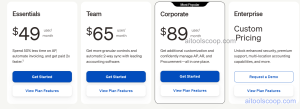
| Plan | Monthly (per user) | Key Features |
|---|---|---|
| Essentials | $49/mo | AP or AR (choose one), bill capture, basic approval workflows, ACH and check payments |
| Team | $65/mo | AP + AR combined, multi-user collaboration, custom approval policies |
| Corporate | $89/mo | Advanced controls, custom user roles, full audit trail, priority support |
| Enterprise | Custom | Dedicated implementation, advanced security, custom integrations, volume pricing |
Pricing is per user per month. Transaction fees may apply for wire transfers and international payments. Always verify current rates at bill.com. For more AI finance tool reviews, visit aitoolscoop.com.
Who Should Use BILL?
BILL is best suited for small to mid-sized businesses that process a regular volume of vendor bills and customer invoices and want to replace manual data entry, paper checks, and email approval chains. Finance teams managing AP and AR across multiple approvers will benefit most from BILL's workflow automation. BILL is not a full accounting system — it is designed to work alongside QuickBooks, Xero, or Sage rather than replace them. Very early-stage startups or micro-businesses with minimal bill volume may find the per-user cost difficult to justify.
Frequently Asked Questions
BILL (formerly Bill.com) is a cloud-based financial operations platform that automates accounts payable and accounts receivable for small and mid-sized businesses. It handles AI-powered bill capture, configurable approval workflows, multi-method vendor payments, customer invoicing, and online payment acceptance — with two-way sync to QuickBooks, Xero, Sage Intacct, and NetSuite.
BILL Essentials is $49 per user per month and covers either AP or AR. Team is $65 per user per month and includes both AP and AR. Corporate is $89 per user per month with advanced controls and audit features. Enterprise is custom-priced. Transaction fees for wire transfers and international payments apply in addition to subscription costs.
Yes. BILL integrates with both QuickBooks Online and QuickBooks Desktop via two-way sync. Bills paid in BILL automatically post to QuickBooks, and invoices from QuickBooks can sync to BILL for collection. This eliminates duplicate entry and keeps both platforms reconciled without manual exports.
Yes. BILL handles both accounts payable (paying vendor bills) and accounts receivable (collecting customer invoice payments). The Essentials plan requires choosing one or the other. The Team plan and above include both AP and AR on a single platform, giving finance teams a unified view of cash flow.
Top BILL alternatives include Tipalti (stronger for mid-market AP and global mass payments), Melio (simpler and more affordable for very small businesses), AvidXchange (well-suited for construction and real estate), and Stampli (AP automation with strong invoice collaboration features). BILL remains a leading choice for SMBs that need combined AP and AR automation with broad accounting integrations.