Fotor (fotor.com) is a comprehensive AI-powered photo editing platform that combines professional editing tools with advanced artificial intelligence features. With over 300 million users worldwide, Fotor streamlines photo enhancement, background removal, object removal, portrait retouching, and AI image generation into a single browser-based or desktop application. The platform serves everyone from social media creators and e-commerce sellers to professional photographers, offering both quick one-click fixes and detailed manual editing controls.
How Fotor Works
You upload an image to Fotor's web editor, mobile app, or desktop application and access AI-powered tools through an intuitive interface. The AI Photo Enhancer analyzes your image and automatically adjusts lighting, sharpness, color balance, and clarity with a single click. For more control, you can manually adjust parameters, remove backgrounds, erase unwanted objects with the Magic Eraser, apply filters and effects, or generate entirely new images from text prompts. Fotor introduced Sisi, an AI agent that understands natural language commands — you can simply type "make this brighter and remove the background" and the AI handles multiple edits automatically. Results are processed in seconds, and you can export in various formats or continue editing with additional tools.
Key Features
- One-click AI photo enhancement — automatically improve lighting, sharpness, color, and clarity to transform blurry or dull photos instantly
- AI background removal — extract subjects from images in seconds with accurate edge detection, even for complex details like hair
- Magic Eraser object removal — seamlessly remove unwanted elements, watermarks, people, or objects from photos with AI-powered content-aware fill
- AI portrait retouching — smooth skin, remove blemishes, whiten teeth, and enhance facial features automatically for magazine-quality results
- Batch editing — process multiple photos at once with the same edits, filters, or watermarks to save hours on repetitive tasks
- Text-to-image AI generator — create original images from text descriptions with multiple art styles and models including the latest AI generators
- AI image upscaler — enhance resolution up to 4K using AI super-resolution technology without losing quality
- Sisi AI Agent — natural language editing assistant that executes multiple complex edits from simple conversational commands
- 100,000+ templates and design resources — access professional templates for social media posts, collages, banners, and marketing materials
- Cross-platform availability — works seamlessly across web browsers, iOS, Android, Windows, and Mac with synchronized accounts
Fotor Pricing
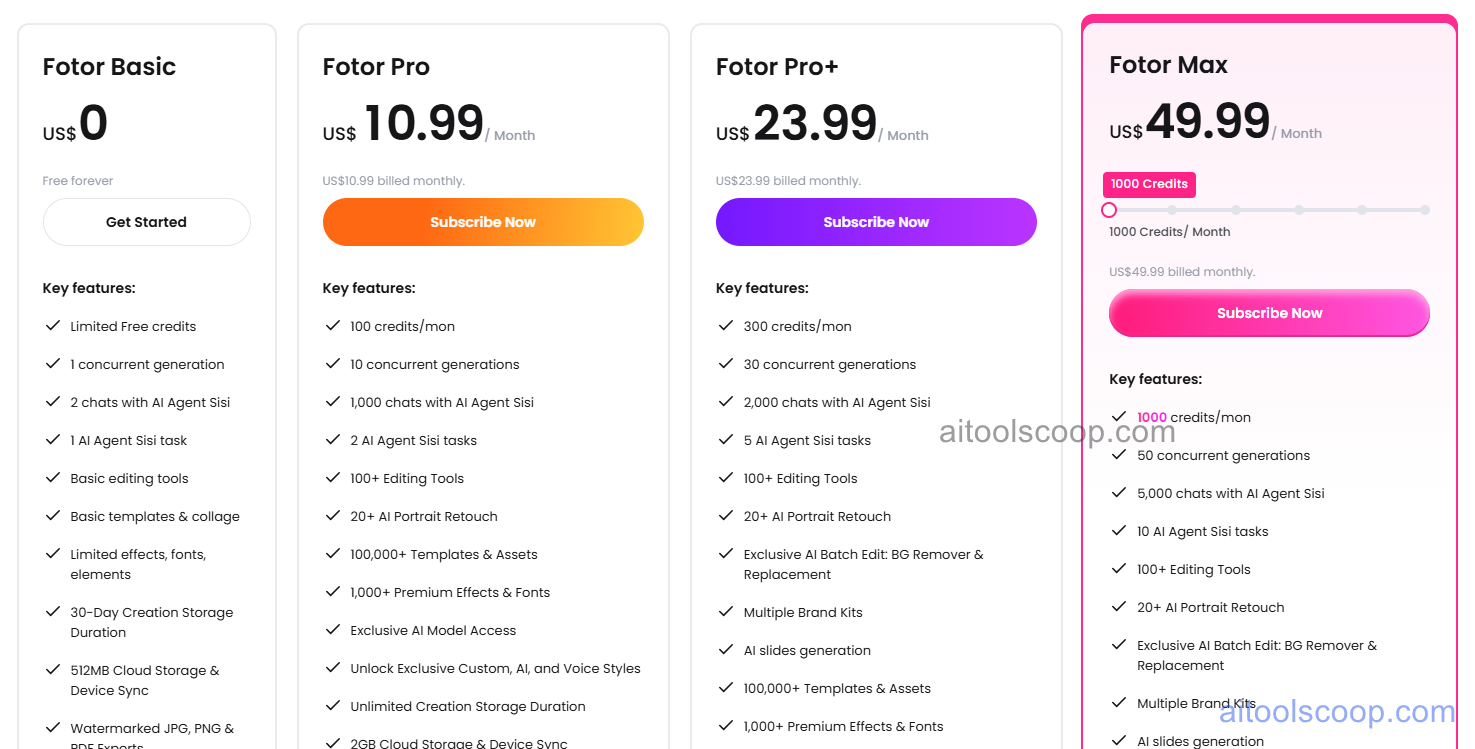
- Free — $0/month — basic editing tools, limited AI features, standard templates, limited credits for AI generation, ads present, basic cloud storage.
- Pro — $10.99/month or $3.99/month billed annually — ad-free experience, 100+ advanced editing tools, AI photo enhancer, background remover, magic eraser, batch editing up to 100 images, 100,000+ premium templates, 200+ photo effects, priority processing, 1GB cloud storage, 1,000 Sisi AI agent chats per month.
- Pro+ — $23.99/month or $5.83/month billed annually — everything in Pro plus 1,000,000+ HD stock photos for commercial use, batch editing up to 500 images, 10GB cloud storage, 2,000 Sisi AI agent chats per month, priority support, API access for businesses, unlimited downloads.
- Enterprise — $49.99/month or $13.99/month billed annually — custom solutions for teams and agencies with advanced API access, dedicated account management, enhanced batch processing, team collaboration features, and priority technical support.
Always check the latest rates on the official website. For more AI tool reviews, visit aitoolscoop.com.
Who Should Use Fotor?
Fotor is ideal for social media managers who need to create and enhance daily content quickly, e-commerce sellers requiring clean product photos with background removal, real estate agents enhancing property images, content creators producing graphics for multiple platforms, small business owners designing marketing materials without hiring designers, and photographers seeking a faster alternative to traditional editing software. Its combination of AI automation and manual control makes it suitable for both beginners needing quick results and professionals requiring efficient batch workflows. The free plan is genuinely functional for casual users, while the Pro plan delivers professional capabilities at a fraction of Adobe's cost.