

Home/ AI Tools /Ai Video /Descript
Descript Paid
🤖 Ai Video
#2 in Ai Video

Descript

Descript is an AI-powered audio and video editing platform that lets you edit media by editing text. Used by podcasters, YouTubers, and video teams. Free plan available. Paid plans from $16/month.

4.4 / 5 Paid From $24/mo
Quick Info
💰 Pricing$24/mo
⭐ Rating4.4 / 5
🆓 Free Plan❌ No
📂 CategoryAi Video
🌐 WebsiteVisit ↗
🕐 Last UpdatedApr 4, 2026
🔀 Alternatives10 tools
Verified Data Updated Apr 4, 2026
Independently Reviewed No paid placements
Detailed Analysis Hands-on testing
Key Features
  • Text-based video and audio editing — edit media by editing transcript
  • Automatic filler word removal with one click
  • Overdub voice cloning for mistake correction without re-recording
  • AI Underlord suite — scene detection, highlights, social clip generation
  • Built-in screen and webcam recorder with AI cleanup
  • Multitrack podcast editing on paid plans
  • Direct publishing to Spotify, YouTube, and RSS on Creator and above
4.4
Overall Rating
Ease of Use
4.6
Features
4.4
Value
4.1
Performance
4.5
Support
4.3
Pros & Cons
👍 Pros
  • Free plan available with no credit card required
  • Text-based editing eliminates the need to learn timeline software
  • Filler word removal saves significant post-production time
  • Overdub voice cloning available from Hobbyist plan
  • 4K export and full AI suite available on Creator at $24/month
👎 Cons
  • Free plan exports are watermarked
  • Transcription hour caps apply on Hobbyist and Creator plans
  • Overdub voice cloning requires minimum voice sample recording
  • Heavy projects with long timelines can slow the editor interface
📖

About Descript

Descript (descript.com) is an AI-native audio and video editor that replaces the traditional timeline editing workflow with a document-based approach. When you import a recording, Descript transcribes it automatically and lets you edit the audio or video by editing the text transcript. Delete a sentence from the transcript and the corresponding audio or video is removed. It is the fastest way to cut, clean, and publish spoken-word content without learning professional editing software.

How Descript Works

Import a video or audio file, and Descript transcribes it within minutes using its Whisper-powered transcription engine. The transcript appears alongside the media timeline. Edit the text to cut content, remove filler words, or rearrange segments — the media updates in real time. On paid plans, Overdub lets you clone your own voice to correct mistakes by typing new words, and the AI Underlord suite handles scene detection, highlight extraction, and automatic social clip generation.

Key Features

  • Text-based video and audio editing — edit media by editing the transcript, no timeline scrubbing required
  • Automatic filler word removal — one-click deletion of all "um", "uh", and pause words
  • Overdub voice cloning — clone your own voice to correct or add words without re-recording
  • AI Underlord suite — automatic scene detection, highlight extraction, and social clip generation
  • Screen recording — built-in screen and webcam recorder with AI cleanup tools
  • Multitrack editing — full podcast and multi-speaker production support on paid plans
  • Publish to Spotify, YouTube, and RSS — direct publishing integrations on Creator and above

Descript Pricing
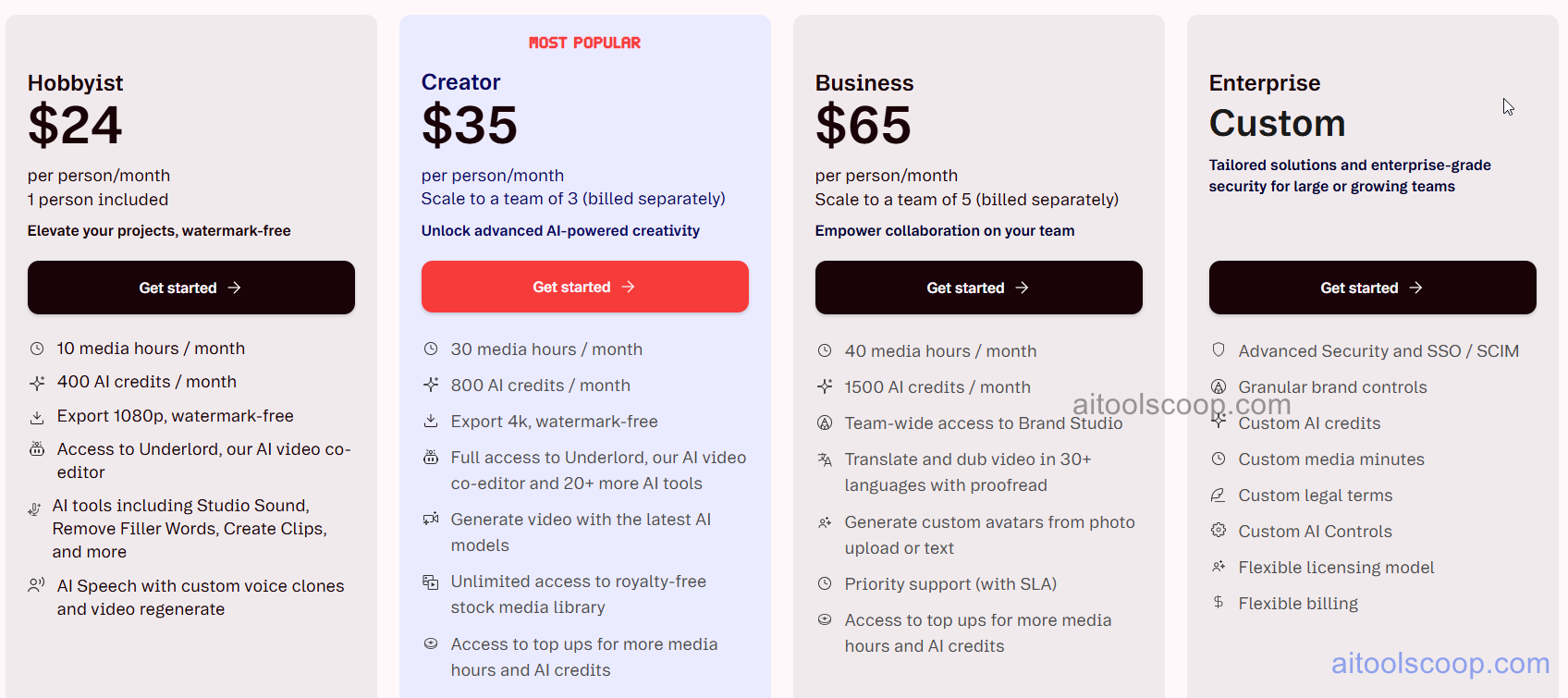
Descript Pricing, Transcription Hour Limits, 4K Video Export Tiers and Overdub Voice Features
Descript: Tiered Pricing for Text-Based Video and Audio Editing
  • Free — $0/month — 1 hour of transcription per month, watermarked exports, basic editing tools, no Overdub, no AI Underlord features.
  • Hobbyist — $24/month (billed yearly) — 10 hours of transcription per month, watermark-free exports, filler word removal, basic Overdub, 720p export resolution.
  • Creator — $35/month (billed yearly) — 30 hours of transcription per month, full AI Underlord suite, full Overdub voice cloning, 4K export, direct publishing to Spotify and YouTube, multitrack editing.
  • Business — $65/month (billed yearly) — unlimited transcription, team collaboration, shared asset libraries, advanced analytics, dedicated support, custom brand kits.Pricing is subject to change. Always check the latest rates on the official website. For more AI tool reviews, visit aitoolscoop.com.

Who Should Use Descript?

Descript is the right tool for solo podcasters, YouTube creators, and video marketing teams who produce high volumes of spoken-word content and need to cut editing time significantly. The Creator plan is the minimum for anyone needing 4K exports and the full AI suite. The Business plan is best for agencies or teams with shared production workflows.


💰

Pricing Plans

Plan Price Includes
Paid $24/mo Full access + priority support
Check Current Pricing →
Affiliate Disclosure: This page contains affiliate links. If you click and make a purchase, we may earn a small commission at no extra cost to you. We only recommend tools we genuinely believe in.

🎯 Explore More

Discover other curated resources from our platform

🛠️ AI Tools View All →
How to Choose the Best AI SEO Tool in 2026: I Tested the Top 5 So You Don’t Have To
How to Choose the Best AI…
Freepik
Freepik
★ 3.9
Kling AI
Kling AI
★ 4.8
⚔️ VS Comparisons View All →
Claude vs ChatGPT
Claude vs ChatGPT
Claude 3.7 Sonnet vs ChatGPT GPT-4o
ChatGPT vs Grok: 2026 Comparison — Pricing, Features & Verdict
ChatGPT vs Grok: 2026 Comparison —…
ChatGPT vs Grok
ChatGPT vs Gemini: Which AI Writing Tool Wins in 2026?
ChatGPT vs Gemini: Which AI Writing…
💡 Free Prompts View All →
💡
Expert-Level Claude Prompts for Independent Consultants…
🔥 4.9K uses
💡
Gemini Prompt: Entrepreneur Market Validation
🔥 9.1K uses
💡
AI Prompt to Write a Newsletter…
🔥 12.9K uses
💡 Free Prompts


