

BeFunky (befunky.com) is an all-in-one creative platform that unifies photo editing, collage creation, and graphic design into a single browser-based application. What makes BeFunky distinctive is its signature Artsy effects — AI-powered filters that transform photos into paintings, cartoons, sketches, and artistic renderings with realistic textures and natural-looking brush strokes. Unlike tools that focus purely on technical editing, BeFunky emphasizes creative expression and ease of use, making professional-quality visual content accessible to users without design expertise. The platform operates entirely in web browsers with mobile apps for iOS and Android, eliminating installation requirements while providing cross-device accessibility.
How BeFunky Works
Access BeFunky directly in your browser and choose between three modules: Photo Editor for enhancement and retouching, Collage Maker for combining multiple images, or Designer for creating graphics from templates. Upload an image and use one-tap AI enhancement to automatically adjust brightness, contrast, and colors. The AI background remover instantly detects subjects and removes backgrounds with accurate edge handling. BeFunky's unique Artsy effects apply artistic transformations — turn photos into oil paintings, watercolors, pencil sketches, or pop art with a single click. The Collage Wizard automatically generates balanced layouts from your photos without cropping, while the Designer module offers templates for social media posts, business cards, flyers, and marketing materials. Batch editing allows processing multiple images with identical adjustments for efficiency.
Key Features
- Artsy effects — AI-powered artistic transformations turning photos into paintings, cartoons, sketches with realistic textures and brush strokes
- AI background remover — instant subject detection and background removal with clean edge handling
- One-tap image enhancer — automatic adjustment of brightness, contrast, exposure, and colors for instant improvement
- Portrait retouching suite — comprehensive tools for skin smoothing, blemish removal, teeth whitening, wrinkle reduction, reshaping
- Collage Wizard — automatic generation of balanced, high-resolution collages without cropping photos
- Batch editing — process multiple photos simultaneously with identical edits, watermarks, or resizes
- Designer module — create graphics from thousands of templates for social media, marketing, and print
- Advanced editing tools — full suite including cropping, exposure adjustment, color correction, filters, overlays, and text
- Cross-platform access — works in browsers, iOS, Android with cloud storage for saving projects
- No watermarks — exports without BeFunky branding even on free tier for basic features
BeFunky Pricing
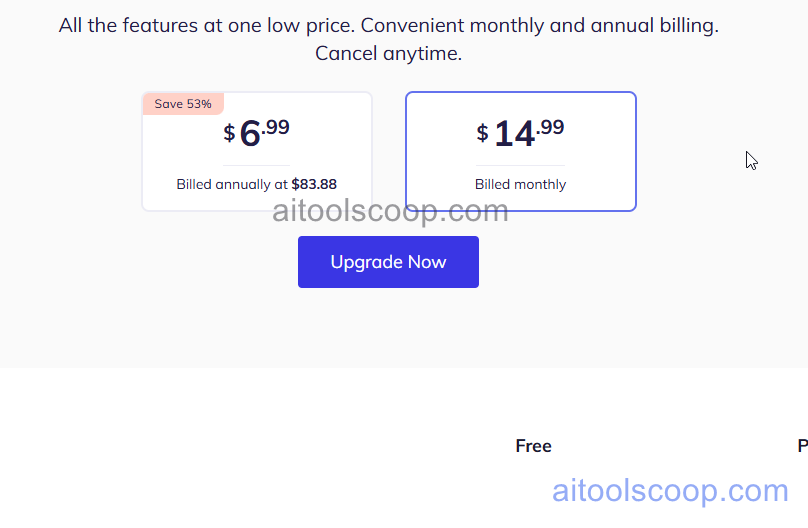
- Free — $0/month — basic photo editing tools, limited collage layouts, standard templates, basic artsy effects, limited batch editing, ads present, no watermark on basic exports.
- Plus — $14.99/month or $6.99/month billed annually — ad-free experience, all premium Artsy effects, AI background remover, advanced retouching tools, unlimited batch editing, all premium templates and design resources, full collage layouts, priority support.
Always check the latest rates on the official website. For more AI tool reviews, visit aitoolscoop.com.
Who Should Use BeFunky?
BeFunky is ideal for casual users and hobbyists who want creative photo effects without learning complex software, social media content creators needing quick graphics and artistic transformations, small business owners creating marketing materials, family collages, and personal projects, educators and students seeking an intuitive tool for school projects and presentations, and anyone who values artistic expression over technical precision. The platform's emphasis on one-tap transformations and creative effects makes it particularly appealing to users who want results quickly without investing time in mastering professional tools. While it lacks the advanced capabilities of Photoshop or the template library of Canva, BeFunky's unique Artsy effects and collage automation fill a specific niche for creative expression at an accessible price point.