Make (formerly Integromat) is the visual workflow automation platform that thinks in flowcharts. Its scenario builder shows every data transformation step as a visual diagram — not a list of actions — making complex automations easier to debug and audit than any text-based tool. Free plan available. Core from $10.59/month.
Visual canvas makes complex automations faster to debug than any list-based tool
Operations pricing is cheaper than Zapier for multi-step scenarios
Free plan includes unlimited scenarios (only operations are capped)
Error routes prevent total workflow failure on a single module error
Preferred by automation agencies for client handoff and documentation
👎 Limitations
Steeper initial learning curve than Zapier for complete beginners
Fewer app integrations than Zapier (1,800 vs 7,000+)
No native code execution node like n8n
AI agent features less mature than dedicated agent platforms
📖
About Make
Make (make.com), rebranded from Integromat in 2022, is the automation platform that treats workflow design as a visual discipline. Where Zapier lists automation steps vertically like a recipe, Make renders the entire scenario as a flowchart — every module, every data path, every conditional branch visible simultaneously on one canvas. For anyone who has ever stared at a 15-step Zapier workflow trying to figure out where data is being dropped, Make's visual approach is immediately obvious as the better debugging experience.
Why the Visual Approach Matters
Complex automations are debugging problems as much as they are building problems. When a workflow fails at step 9 of 15, a text-based list forces you to reconstruct the logic mentally. Make's scenario canvas shows you the entire flow at once — every module's input and output visible, every routing branch labeled, every data mapping inspectable inline. Error identification drops from minutes to seconds. This is why agencies and technical teams that build automations for clients consistently choose Make over Zapier: the scenarios are easier to hand off, document, and maintain.
Key Features
Visual scenario builder — flowchart canvas showing entire automation at once; every data path and branch visible simultaneously
1,800+ app integrations — plus HTTP, webhook, and custom API modules for any service
Operations-based pricing — charged per operation (data bundle processed), not per task step like Zapier; complex multi-module scenarios cost less proportionally
Data stores — built-in key-value database for persisting state between scenario runs without external database
Error handling routes — dedicated error path branches that execute when a module fails, keeping workflows running rather than halting entirely
Scenario scheduling — run automations on a schedule, on webhook trigger, or on demand; 1-minute minimum interval on paid plans
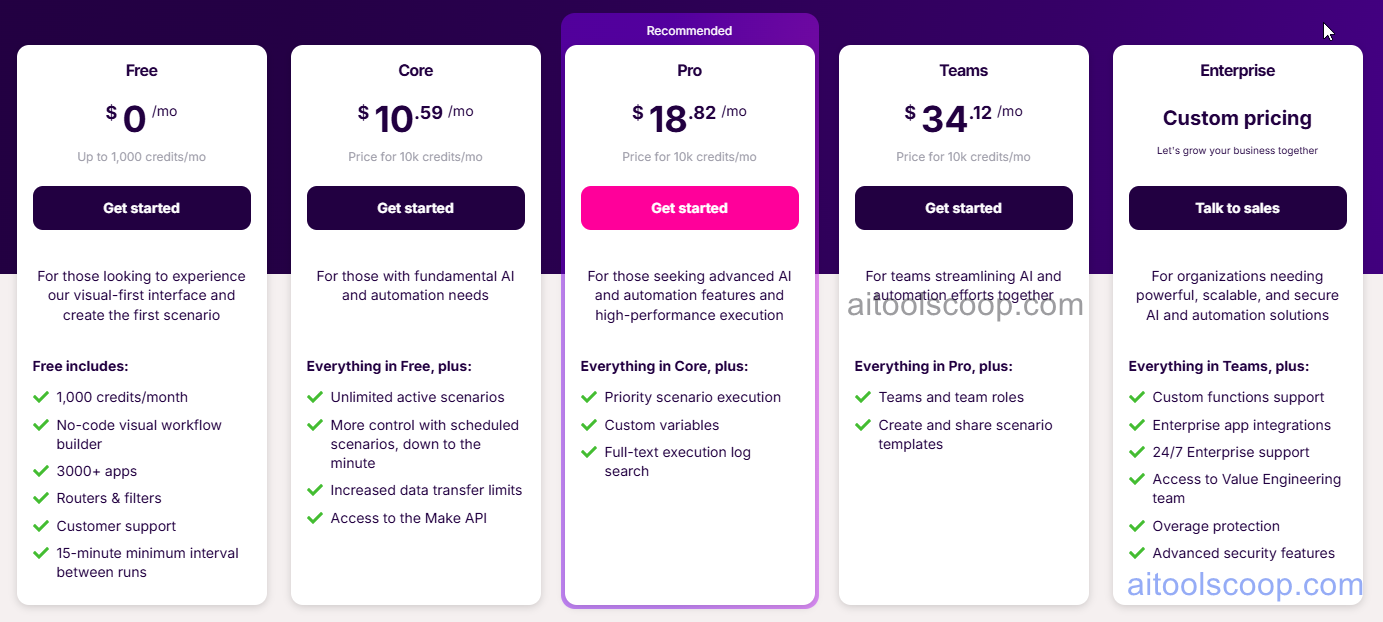
Teams — $34.12/month — 10,000 operations/month, team collaboration, shared scenarios, team roles and permissions.
Pricing is subject to change. Always check the latest rates on the official website. For more AI tool reviews, visit aitoolscoop.com.
Make vs Zapier vs n8n
Make is the best choice for teams building complex multi-branch automations that need to be debugged, documented, and maintained. Zapier is better for simple integrations and has more app connections. n8n is better when custom code execution is required. Make sits in the middle: more powerful than Zapier for complex visual workflows, more accessible than n8n for non-developers.
💰
Pricing Plans
Plan
Monthly
Annual (billed yearly)
Free
Free
Free
Growth
$10.59/mo
$9/mo Save 15%
Pro
$18.82/mo
$16/mo Save 15%
Enterprise
$34.12/mo
$29/mo Save 15%
Plan 5
custom
custom
Free / Core $10.59/mo · Pro $18.82/mo · Teams $34.12/mo · Enterprise custom
Affiliate Disclosure: This page contains affiliate links. If you click and make a purchase, we may earn a small commission at no extra cost to you. We only recommend tools we genuinely believe in.
🎯 Explore More
Discover other curated resources from our platform
 Freemium