

Make (make.com), rebranded from Integromat in 2022, is the automation platform that treats workflow design as a visual discipline. Where Zapier lists automation steps vertically like a recipe, Make renders the entire scenario as a flowchart — every module, every data path, every conditional branch visible simultaneously on one canvas. For anyone who has ever stared at a 15-step Zapier workflow trying to figure out where data is being dropped, Make's visual approach is immediately obvious as the better debugging experience.
Why the Visual Approach Matters
Complex automations are debugging problems as much as they are building problems. When a workflow fails at step 9 of 15, a text-based list forces you to reconstruct the logic mentally. Make's scenario canvas shows you the entire flow at once — every module's input and output visible, every routing branch labeled, every data mapping inspectable inline. Error identification drops from minutes to seconds. This is why agencies and technical teams that build automations for clients consistently choose Make over Zapier: the scenarios are easier to hand off, document, and maintain.
Key Features
- Visual scenario builder — flowchart canvas showing entire automation at once; every data path and branch visible simultaneously
- 1,800+ app integrations — plus HTTP, webhook, and custom API modules for any service
- Operations-based pricing — charged per operation (data bundle processed), not per task step like Zapier; complex multi-module scenarios cost less proportionally
- Data stores — built-in key-value database for persisting state between scenario runs without external database
- Error handling routes — dedicated error path branches that execute when a module fails, keeping workflows running rather than halting entirely
- Scenario scheduling — run automations on a schedule, on webhook trigger, or on demand; 1-minute minimum interval on paid plans
Make Pricing
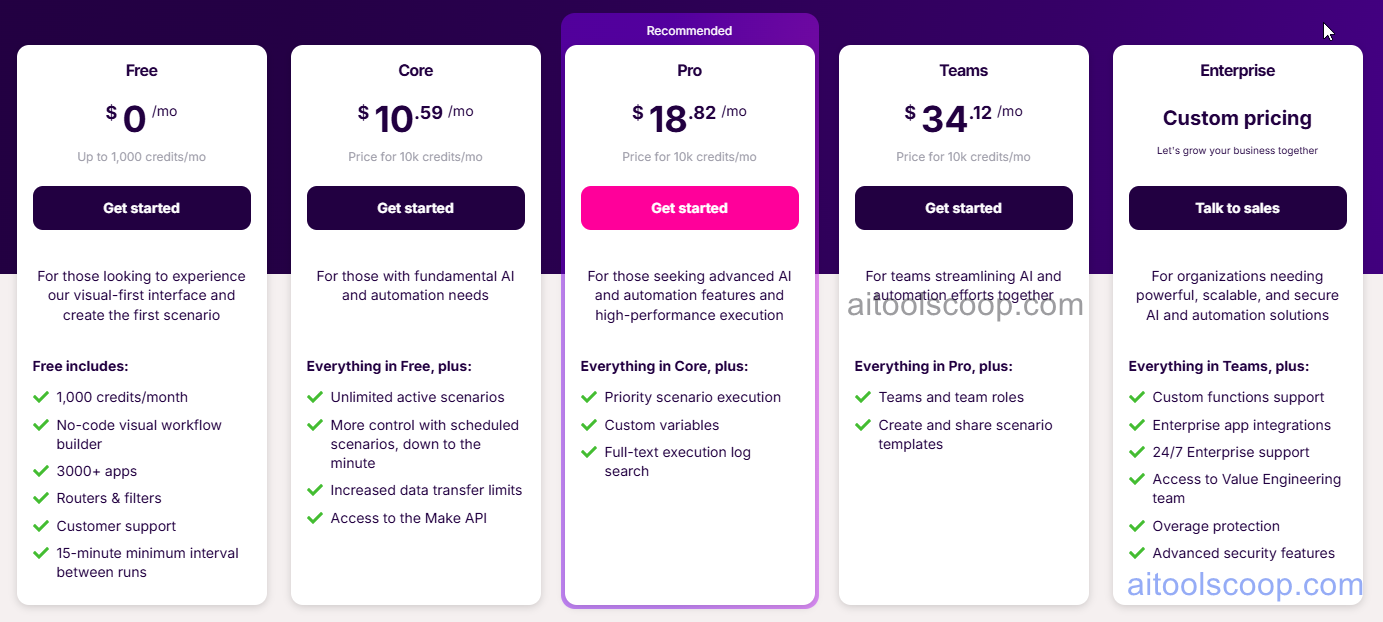
- Free — $0/month — 1,000 operations/month, unlimited scenarios, 15-minute scheduling interval.
- Core — $10.59/month — 10,000 operations/month, 1-minute scheduling, unlimited active scenarios, email support.
- Pro — $18.82/month — 10,000 operations/month, custom variables, full-text execution search, priority support.
- Teams — $34.12/month — 10,000 operations/month, team collaboration, shared scenarios, team roles and permissions.
Pricing is subject to change. Always check the latest rates on the official website. For more AI tool reviews, visit aitoolscoop.com.
Make vs Zapier vs n8n
Make is the best choice for teams building complex multi-branch automations that need to be debugged, documented, and maintained. Zapier is better for simple integrations and has more app connections. n8n is better when custom code execution is required. Make sits in the middle: more powerful than Zapier for complex visual workflows, more accessible than n8n for non-developers.