

Warp (warp.dev) started as a better terminal and ended up as something more interesting: a developer environment where AI understands your command history, your current directory, and your codebase — and uses all of it to give you suggestions that are actually relevant. It runs on macOS, Linux, and Windows, replaces iTerm, Hyper, and the default terminal with a code-editor-quality text experience, and layers multi-agent coding, debugging, and deployment workflows on top. The result is a terminal that developers describe as feeling like having a senior engineer looking over your shoulder — one who never interrupts but always has the right command ready.
What Makes Warp Different From a Regular Terminal?
Most AI coding assistants are IDE extensions. Warp is different: it lives in the terminal, which means it has native context that IDE plugins don't — your shell history, your environment variables, your running processes, your current working directory. When Warp's AI suggests a fix for a failing command, it's seen the actual error output, not a copy-pasted snippet. This matters for debugging infrastructure, not just application code. Warp's AI command suggestions preview before you execute them. You can read exactly what a generated command will do before pressing Enter — a meaningful safety guardrail for anyone running commands against production systems.
Key Features
- Block-based command output — Each command and its output is a distinct "block" you can select, copy, search, and share as a URL, a complete departure from the scrolling-text model of traditional terminals
- AI command suggestions — Inline suggestions tailored to your current directory, session history, and recent errors; preview before executing
- Warp Agent — Multi-step AI agent that can plan, execute, and debug command sequences autonomously, with configurable autonomy levels from "approve every step" to "full auto"
- Warp Drive — Shared workspace for saving and sharing runbooks, common workflows, and environment configs across teams
- Codebase indexing — Index up to 40 repositories (100,000 files each) on the Build plan for context-aware AI assistance across your full project
- Zero Data Retention (ZDR) — SOC 2 compliant; ZDR policies enforced with all contracted LLM providers mean no customer AI data is retained, stored, or used for training
- Bring Your Own Key (BYOK) — Connect your own OpenAI, Anthropic, or Google API keys on Build and Business plans; AI costs flow directly to your existing provider accounts
Warp Pricing
Source: warp.dev/pricing and Warp's official pricing change announcement (October 30, 2025), verified March 2026.
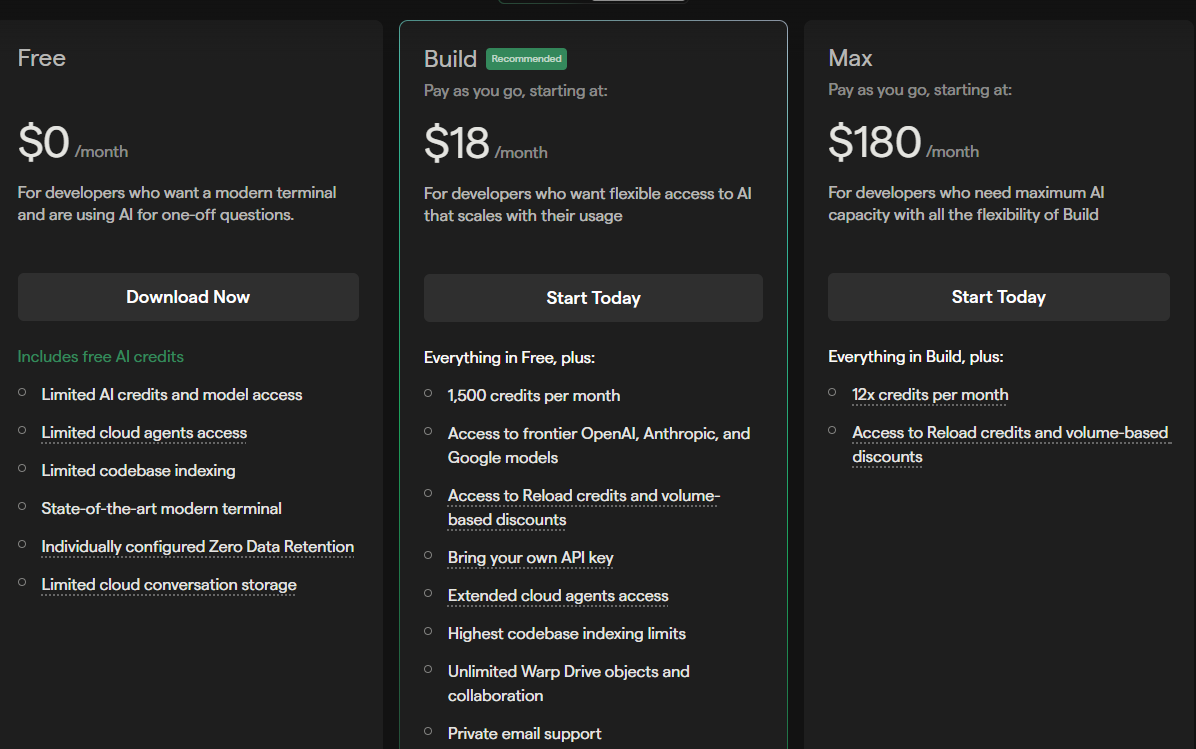
- Free — $0/month — Limited AI credits, core terminal features, Warp Drive access. Suitable for evaluation and occasional use. BYOK not available on the free plan.
- Build — $20/month — 1,500 AI credits/month (reset monthly, do not roll over). Unlimited Warp Drive storage. Index up to 40 code repositories. BYOK for OpenAI, Anthropic, and Google. Add-on Reload Credits available (~50% cheaper than old overage pricing, roll over for 12 months). Replaced the previous Pro/Turbo/Lightspeed tiers as of December 1, 2025.
- Business — $50/user/month — 1,500 AI credits per user, Shared Reload Credits across team, BYOK for all users, SSO, universally applied Zero Data Retention, admin controls, self-serve billing.
- Enterprise — custom pricing — Advanced security, dedicated support, custom contracts, HIPAA/SOC 2 compliance documentation.
Note: Warp simplified its pricing in October 2025, replacing three tiers (Pro/Turbo/Lightspeed) with a single Build plan. Existing subscribers transitioned to Build at their first renewal after December 1, 2025. For the most current details visit warp.dev/pricing.
Warp vs iTerm2 and Traditional Terminals
iTerm2 and the default macOS Terminal are powerful but static — they're sophisticated text rendering engines with no awareness of what you're trying to accomplish. Warp turns the terminal into an active participant: it knows what command you just ran, what the error was, and what your codebase looks like. For developers who live in the terminal — DevOps engineers, backend engineers, data scientists — this context-awareness is qualitatively different from the autocomplete suggestions in traditional shells. The trade-off is that Warp requires an account and internet connection for AI features, and some users are uncomfortable with any telemetry on their terminal sessions. Warp publishes a detailed list of telemetry events and allows opt-out on paid plans, which addresses this for most enterprise users.
Pros & Cons
Pros:
- Block-based output transforms terminal readability — copy, share, and search individual command results
- Context-aware AI sees your actual shell environment, not a text excerpt
- ZDR and SOC 2 compliance make it enterprise-deployable
- BYOK eliminates AI cost uncertainty for heavy users with existing model subscriptions
- Reload Credits roll over 12 months — unused credits don't evaporate at month end
Cons:
- Requires account and internet connection — not fully offline capable
- BYOK unavailable on free plan; costs real money before you can test your own keys
- 1,500 credits/month can run out quickly for heavy agentic usage — add-on credits needed
- Learning curve for teams deeply habituated to traditional terminals and shell workflows
Bottom Line
Warp is the terminal for developers who want AI that actually understands their environment, not just their code. At $20/month the Build plan is easy to justify for any professional developer — the BYOK option alone can offset the cost if you're already paying for model API access. The ZDR and SOC 2 posture makes it viable for regulated industries in a way that most AI dev tools are not.