Home/ AI Tools /AI Video Tools /Vizard
Vizard Freemium
🤖 AI Video Tools
#14 in AI Video Tools

Vizard

Vizard is an AI video editor that automatically transforms long videos into short social clips with captions and effects. Free plan available, paid plans from $29/month.

4.2 / 5 Freemium From $29/mo
Quick Info
💰 Pricing$29/mo
⭐ Rating4.2 / 5
🆓 Free Plan✅ Yes
📂 CategoryAI Video Tools
🌐 WebsiteVisit ↗
🕐 Last UpdatedApr 11, 2026
🔀 Alternatives25 tools
Verified Data Updated Apr 11, 2026
Independently Reviewed No paid placements
Detailed Analysis Hands-on testing
Key Features
  • AI clip detection automatically identifying engaging moments from long videos
  • Auto-generated captions with animated subtitles and customizable styles
  • One-click filler word removal eliminating um, uh, and awkward pauses
  • Speaker detection identifying and labeling different speakers in conversations
  • Smart vertical reframing automatically tracking speakers and key visual elements
  • Template library with pre-designed caption styles, transitions, and effects
  • Timeline-free text-based editing requiring no video editing experience
  • Brand kit for saving logos, colors, and fonts for consistent branding
  • Multi-language transcription and captions supporting 40+ languages
  • Direct publishing to TikTok, YouTube, Instagram, LinkedIn, and Twitter
4.2
Overall Rating
Ease of Use
4.4
Features
4.2
Value
3.9
Performance
4.3
Support
4.1
Pros & Cons
👍 Pros
  • Generous free plan with 120 minutes/month enables extended evaluation
  • Creator plan at $14.50/month annually offers excellent value for regular creators
  • Timeline-free editing ideal for non-editors without traditional editing experience
  • Filler word removal saves hours of manual editing work on unscripted content
  • Speaker detection perfect for podcasts and multi-person interviews
  • Clean, intuitive interface reduces learning curve compared to complex editors
  • Direct publishing streamlines workflow from creation to social distribution
👎 Cons
  • Free plan watermark limits professional use without upgrading
  • AI clip selection sometimes misses context-dependent viral moments
  • Smart reframing occasionally crops out important visual elements
  • 600 minutes/month on Creator plan restrictive for daily long-form creators
  • Multi-language support locked behind Pro plan limits international creators
  • Annual pricing requires upfront commitment for best per-month rates
  • Limited advanced editing features compared to traditional video editors
📖

About Vizard

Vizard (vizard.ai) is an AI-powered video repurposing platform that converts long-form content into social-ready short clips optimized for TikTok, Instagram Reels, YouTube Shorts, and LinkedIn. Using AI to detect speakers, remove filler words, add animated captions, and identify viral-worthy moments, Vizard streamlines the entire repurposing workflow from upload to publication. The platform emphasizes ease of use with a timeline-free editor that requires no video editing experience, making professional-quality clip creation accessible to podcasters, educators, and content marketers.

How Vizard Works

Upload your video file or paste a YouTube/Vimeo link to Vizard. The AI automatically transcribes the audio, detects speakers, and segments the content into coherent topic-based chapters. Enable AI Clips to generate 10-30 short clips (30-120 seconds each) ranked by predicted engagement. Each clip includes auto-generated captions with customizable templates, automatic vertical reformatting keeping speakers in frame, and AI-suggested titles. Use the Remove Filler feature to eliminate "um," "uh," and awkward pauses with one click. Customize caption styles, add brand logos, and apply visual effects from Vizard's template library. Preview clips and export in platform-optimized formats or publish directly to connected social accounts.

Key Features

  • AI clip detection — automatically identifies engaging moments and generates short clips from long videos
  • Auto captions — AI transcription with animated subtitles and customizable styles
  • Filler word removal — one-click elimination of "um," "uh," and awkward pauses
  • Speaker detection — identifies and labels different speakers in podcasts and interviews
  • Smart reframing — automatic vertical crop tracking speakers and key visual elements
  • Template library — pre-designed caption styles, transitions, and effects for different platforms
  • Timeline-free editing — text-based editing without learning complex timeline interfaces
  • Brand kit — save logos, colors, and fonts for consistent branded content
  • Multi-language support — transcription and captions in 40+ languages
  • Direct publishing — export to TikTok, YouTube, Instagram, LinkedIn, and Twitter with scheduling

Vizard Pricing
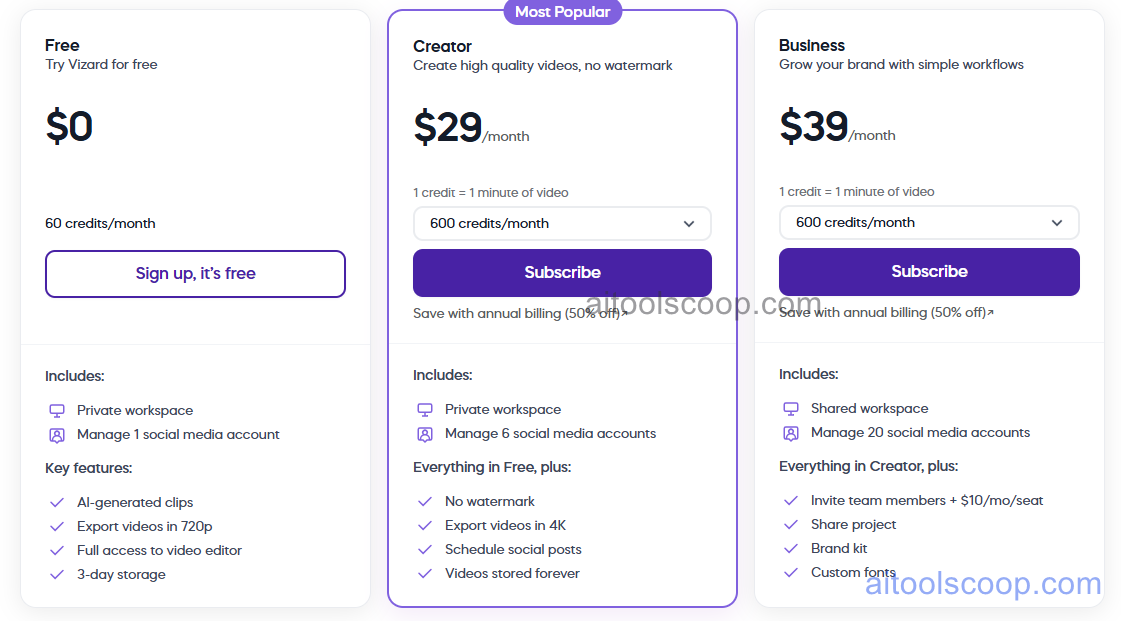
Vizard pricing plans
Vizard pricing — screenshot from vizard.ai
  • Free — $0/month — 120 minutes upload/month, Vizard watermark, 720p exports, basic templates, standard processing speed.
  • Creator — $29/month or $14.50/month billed annually ($174/year) — 600 minutes upload/month, no watermark, 1080p HD, all templates and effects, priority processing, filler word removal, brand kit.
  • Pro — $39/month or $19.50/month billed annually ($234/year) — 1,200 minutes upload/month, 4K exports, speaker detection, multi-language support, API access, team collaboration (3 seats), white-label options.

Always check the latest rates on the official website. For more AI tool reviews, visit aitoolscoop.com.

Who Should Use Vizard?

Vizard is perfect for podcasters repurposing episodes into promotional clips without hiring editors, YouTube creators extracting shorts from long videos to boost channel growth, course creators and educators generating promotional snippets from lectures and tutorials, marketers transforming webinars and product demos into social campaigns, corporate communications teams creating internal highlight reels from all-hands meetings, and agencies managing video content for multiple clients with limited editing resources. The Creator plan suits individual creators with weekly long-form output, while the Pro plan serves power users and small teams needing speaker detection, multi-language support, and collaboration features.


💰

Pricing Plans

Plan Price Includes
Pro $29/mo Full access + priority support
Check Current Pricing →
Affiliate Disclosure: This page contains affiliate links. If you click and make a purchase, we may earn a small commission at no extra cost to you. We only recommend tools we genuinely believe in.

🎯 Explore More

Discover other curated resources from our platform

🛠️ AI Tools View All →
TestSprite 2.1
TestSprite 2.1
★ 3.9
Bolt.new
Bolt.new
★ 4.3
Granola AI
Granola AI
★ 4.1
⚔️ VS Comparisons View All →
Claude vs ChatGPT
Claude vs ChatGPT
Claude 3.7 Sonnet vs ChatGPT GPT-4o
ChatGPT vs Gemini: 2026 Comparison — Pricing, Features & Verdict
ChatGPT vs Gemini: 2026 Comparison —…
ChatGPT vs Gemini
ChatGPT vs Kimi: 2026 Comparison — Pricing, Features & Verdict
ChatGPT vs Kimi: 2026 Comparison —…
ChatGPT vs Kimi
💡 Free Prompts View All →
💡
Claude for SaaS Novelists: Write an…
🔥 6.7K uses
💡
Gut Health Improvement Plan with Diet…
🔥 17.4K uses
💡
How Consulting Enterprise Sales Leads Can…
🔥 4.1K uses
💡 Free Prompts

