

Quso (quso.ai) is an AI-powered video editing platform designed specifically for short-form social media content on TikTok, Instagram Reels, and YouTube Shorts. Quso automates tedious editing tasks including automatic caption generation with word-level highlighting, smart jump cuts removing silences and filler words, dynamic text animations, and trending effect application. By analyzing successful viral content patterns, Quso helps creators produce engagement-optimized videos in minutes rather than hours, making professional-quality editing accessible to non-editors.
How Quso Works
Upload your raw video footage or screen recording to Quso. The AI automatically transcribes the audio and generates synchronized captions with customizable styles and animations. Enable Auto Cut to remove silences, pauses, and filler words ("um," "uh," "like") with a single click, creating a fast-paced edit optimized for retention. Choose from trending templates that apply popular effects, transitions, and music matching current viral content styles. Customize text positions, fonts, colors, and animations, or let Quso's AI suggest optimal placements based on video composition. Add B-roll, stock footage, emojis, and stickers from Quso's library. Preview the final edit and export in vertical 9:16 format optimized for mobile platforms.
Key Features
- Auto caption generation — AI transcription with word-level highlighting and animated text effects
- Smart jump cuts — automatic removal of silences, pauses, and filler words for fast-paced edits
- Viral templates — trending effects and styles analyzed from successful social media content
- Multi-language support — caption generation and transcription in 50+ languages
- B-roll library — stock footage and visuals automatically suggested based on script content
- AI voiceover — text-to-speech with natural-sounding voices in multiple accents
- Background music — royalty-free tracks with automatic volume ducking under speech
- Emoji and sticker effects — timed animations synchronized to key moments in the video
- Batch processing — apply consistent edits across multiple videos simultaneously
- Direct export — optimized vertical format for TikTok, Reels, and Shorts with proper metadata
Quso Pricing
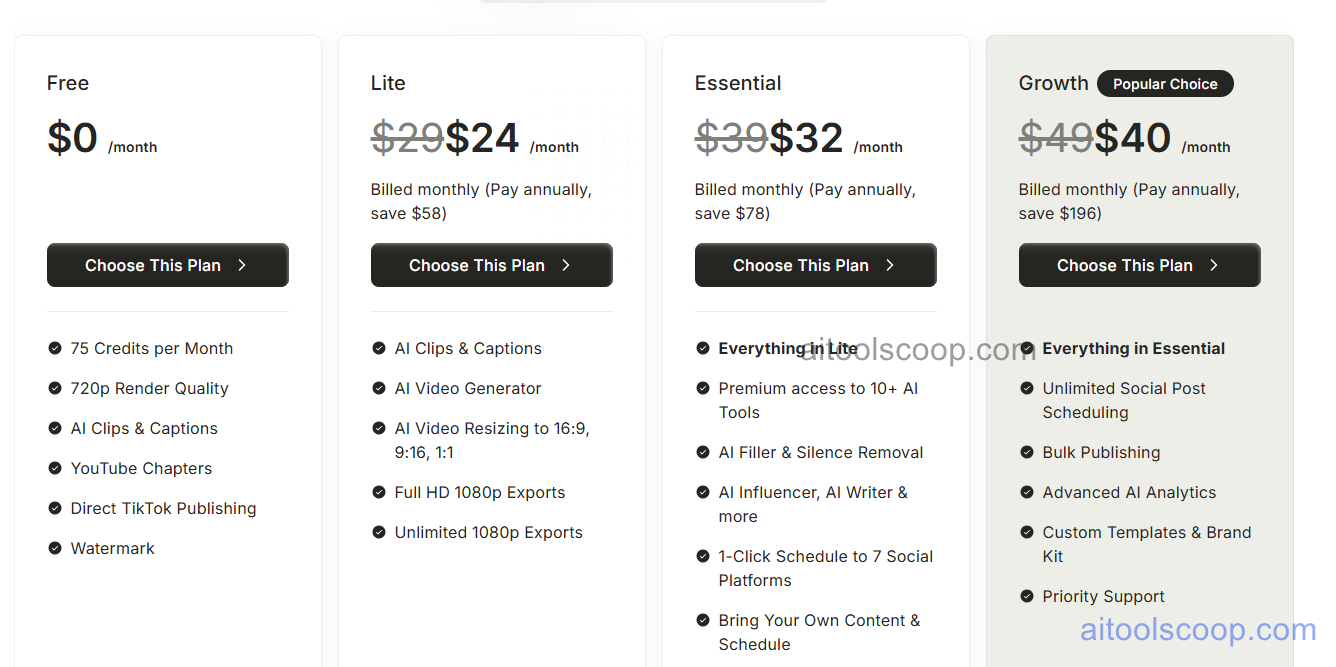
- Free — $0/month — 3 video exports/month, Quso watermark, 720p resolution, basic templates, 10 minutes max video length.
- Creator — $24/month or $15/month billed annually ($180/year) — 30 video exports/month, no watermark, 1080p HD, all templates and effects, 30 minutes max video length, priority rendering.
- Pro — $32/month or $20/month billed annually ($240/year) — 100 video exports/month, 4K resolution, batch processing, custom branding, API access, 60 minutes max video length.
- Agency — $40/month or $25/month billed annually ($300/year) — unlimited exports, team collaboration (up to 5 seats), white-label options, dedicated support, unlimited video length.
Always check the latest rates on the official website. For more AI tool reviews, visit aitoolscoop.com.
Who Should Use Quso?
Quso is ideal for social media content creators producing daily TikTok, Reels, or Shorts without professional editing skills, influencers and personal brands scaling video output while maintaining quality, small business owners creating promotional content for social platforms, podcasters repurposing long-form content into viral clips, and marketing agencies managing multiple client social accounts. The Creator plan suits individual creators with consistent posting schedules, while the Pro plan serves power users needing batch processing and higher export volumes. The Agency plan fits teams managing multiple brands and requiring white-label capabilities.