

Munch Studio (getmunch.com) is an AI video repurposing platform that analyzes long-form content and generates platform-optimized short clips for TikTok, Instagram Reels, YouTube Shorts, and LinkedIn. Using GPT-powered content analysis and proprietary engagement prediction algorithms, Munch identifies the most shareable moments from podcasts, webinars, tutorials, and livestreams, then automatically adds captions, crops to vertical format, and applies trending visual effects. With built-in social media trend analysis and automatic posting capabilities, Munch serves content creators and marketers scaling video distribution across multiple platforms.
How Munch Studio Works
Upload your long-form video or paste a YouTube/Vimeo link. Munch's GPT-powered AI analyzes the content for key topics, emotional peaks, and coherent narrative segments that perform well on social media. The platform generates multiple short clips (usually 10-40 clips per upload depending on source length) with automatic vertical reframing, animated captions, and AI-written titles. Each clip receives a "Munch Score" from 0-100 predicting virality based on trending topics, engagement patterns, and platform-specific algorithms. Review suggested clips, customize captions and branding, and either download for manual posting or schedule direct publishing to connected social accounts. Munch also generates AI-written social media posts tailored to each platform's best practices.
Key Features
- GPT content analysis — AI identifies key topics, quotes, and viral moments in long-form videos
- Munch Score prediction — 0-100 virality rating based on trending topics and engagement data
- Auto vertical reformatting — smart crop tracking speakers and key elements in 9:16 format
- Animated captions — auto-generated subtitles with customizable fonts, colors, and animations
- Trend analysis — tracks current social media trends and suggests relevant content angles
- AI social media posts — generates platform-optimized captions and hashtags for each clip
- Multi-platform export — optimized outputs for TikTok, Reels, Shorts, LinkedIn, Twitter
- Direct scheduling — publish clips directly to connected social accounts with calendar planning
- Brand kit — save logos, colors, fonts, and caption styles for consistent branding
- Collaboration workspace — team access for reviewing, editing, and approving clips
Munch Studio Pricing
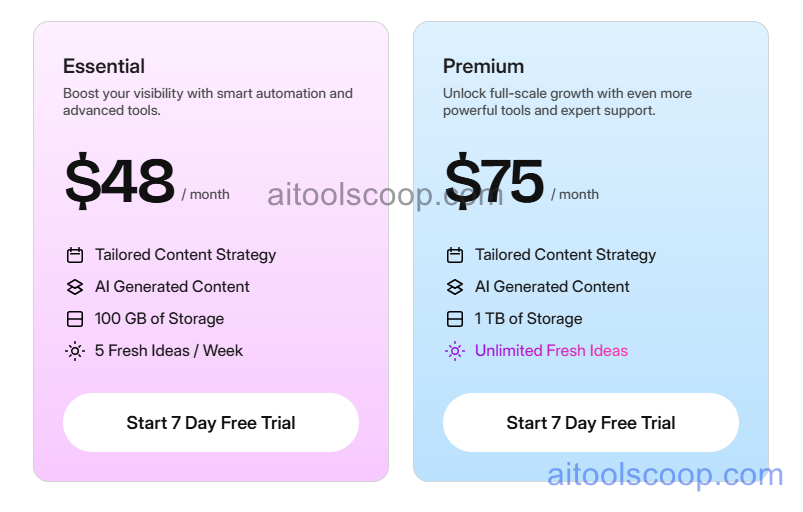
- Free — $0/month — 20 minutes upload/month, Munch watermark, 720p exports, basic captions, manual posting only.
- Pro — $48/month or $38/month billed annually ($456/year) — 200 minutes upload/month, no watermark, 1080p HD, brand kit, direct social posting, priority processing, trend analysis.
- Premium — $75/month or $60/month billed annually ($720/year) — 500 minutes upload/month, 4K exports, team collaboration (3 seats), API access, white-label options, dedicated account manager.
Always check the latest rates on the official website. For more AI tool reviews, visit aitoolscoop.com.
Who Should Use Munch Studio?
Munch Studio is ideal for content creators and influencers producing regular long-form content (podcasts, YouTube videos, livestreams) who need to maintain active presences across TikTok, Instagram, and other short-form platforms, marketing teams repurposing webinars and product demos into social campaigns, agencies managing video content for multiple clients requiring efficient clip generation and scheduling, educators transforming course lectures into promotional snippets, and B2B companies extracting thought leadership clips from conferences and panels. The Pro plan suits serious creators with consistent long-form output, while the Premium plan serves agencies and teams needing collaboration features and higher upload volumes.