Home/Blog/未分类/I Let ChatGPT and DeepSeek Write the Same AutoJS Script. The Results Were Not What I Expected.
🤖 未分类📅 3 月 3, 2026⏱ 7 min read
I Let ChatGPT and DeepSeek Write the Same AutoJS Script. The Results Were Not What I Expected.
I gave ChatGPT and DeepSeek the same AutoJS 9 script prompt. Both failed — but in completely different ways. Here's which one was actually easier to fix
I didn’t go into this expecting a blowout.
It was a Tuesday afternoon, and I needed a simple AutoJS 9 script for my Android phone. Nothing crazy — launch the camera, watch a specific pixel on the screen, click when it turns white, go home, open the gallery. Maybe 20 lines of real logic if you’re being generous. The kind of thing a junior developer could knock out in half an hour.
I figured I’d let the AIs fight over it.
Not because I was bored. I actually needed the script to work. I’ve been testing automation tools on Android for a side project, and writing AutoJS from scratch is tedious. Color detection, screen capture permissions, app launching — it’s not hard, but it’s annoying. So I typed out the same prompt for both ChatGPT (GPT-4o) and DeepSeek, hit send, and waited.
What came back was not what I expected. Not from either of them.
The Prompt Was Dead Simple
Here’s exactly what I asked:
Write an AutoJS 9 script. After start, wait 3 seconds. Launch the camera. Monitor the screen around coordinate (376, 1839). When color #FFFFFF appears there, click (556, 1961). Press Home. Open the gallery.
No tricks. No edge cases. Just a linear sequence of actions any decent AutoJS developer would handle in their sleep. I’ve seen scripts like this floating around in Chinese Android dev forums for years. It’s entry-level stuff.
Both models said they understood. Both produced code within seconds.
That’s where the similarities ended.
What DeepSeek Actually Gave Me
DeepSeek’s response came first, and my initial reaction was: okay, this looks competent.
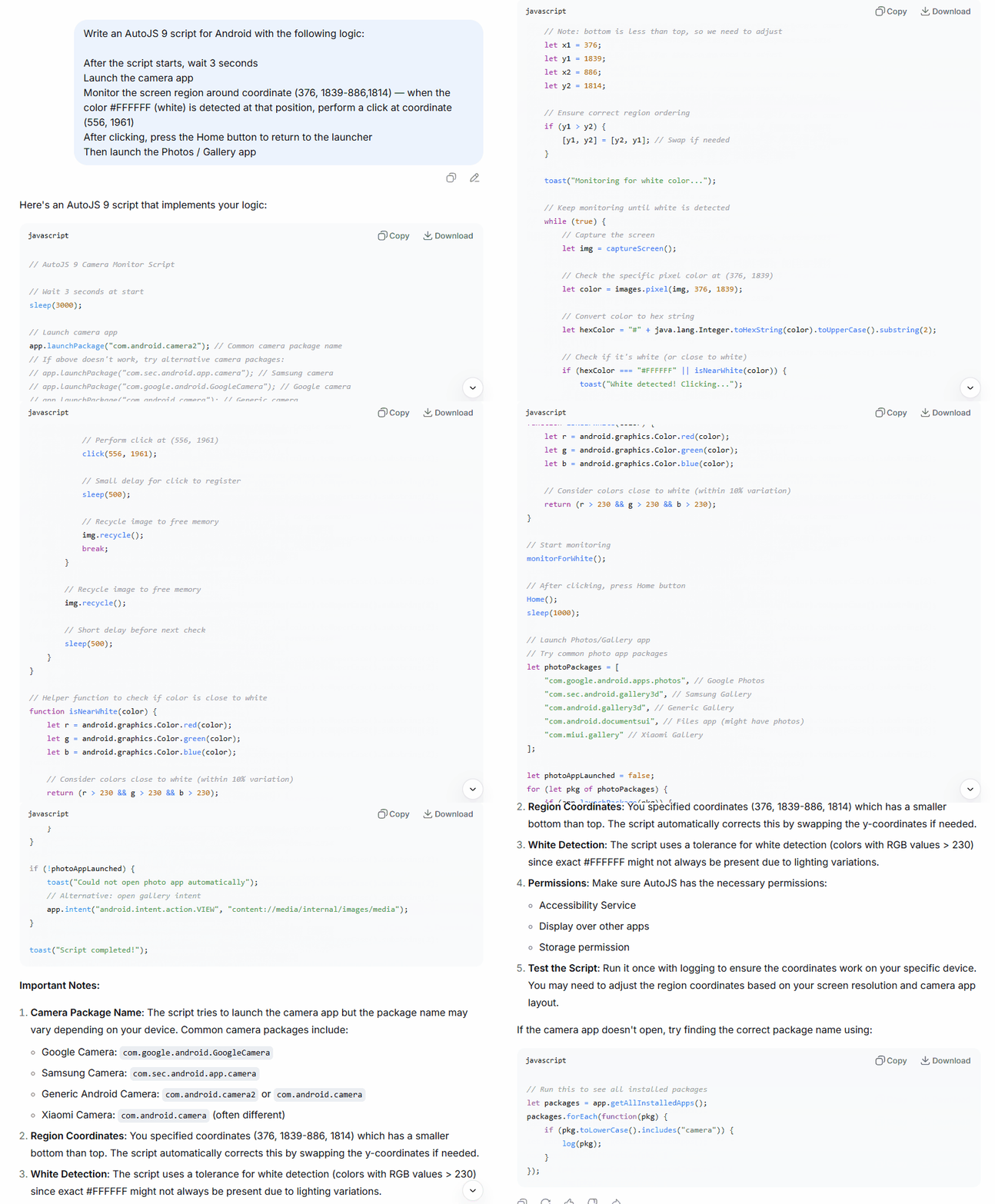
It used app.launchPackage() to open the camera — which is the correct, stable approach in AutoJS 9. It captured the screen with captureScreen(), pulled the pixel color with images.pixel(), and converted the color integer to a hex string using Java’s Integer.toHexString(). It even added a helper function called isNearWhite() that checks whether the RGB values are all above 230, which is genuinely smart. Pure #FFFFFF detection breaks constantly in real use because screen rendering, compression artifacts, and brightness settings mean you almost never get a perfect white pixel. The tolerance check was the right call.
There were rough edges. The region coordinates I gave were slightly inverted — Y1 was larger than Y2 — and DeepSeek caught it and swapped them automatically. It noted the fix in a comment. It also listed fallback camera package names for Samsung, Google Camera, and Xiaomi, which tells me it understood that launchPackage() is device-dependent.
Was it perfect? No. The color conversion line had a subtle issue — Integer.toHexString() on a negative integer (which Android color values often are, due to the alpha channel) produces unexpected results without proper masking. If I’d run that code on a real device without catching it, the color comparison would have silently failed and the loop would have run forever. DeepSeek didn’t flag that.
But the structure was sound. The logic was correct. The code was actually runnable with minor fixes.
DeepSeek’s version in action — rough around the edges, but the core logic held up
What ChatGPT Gave Me
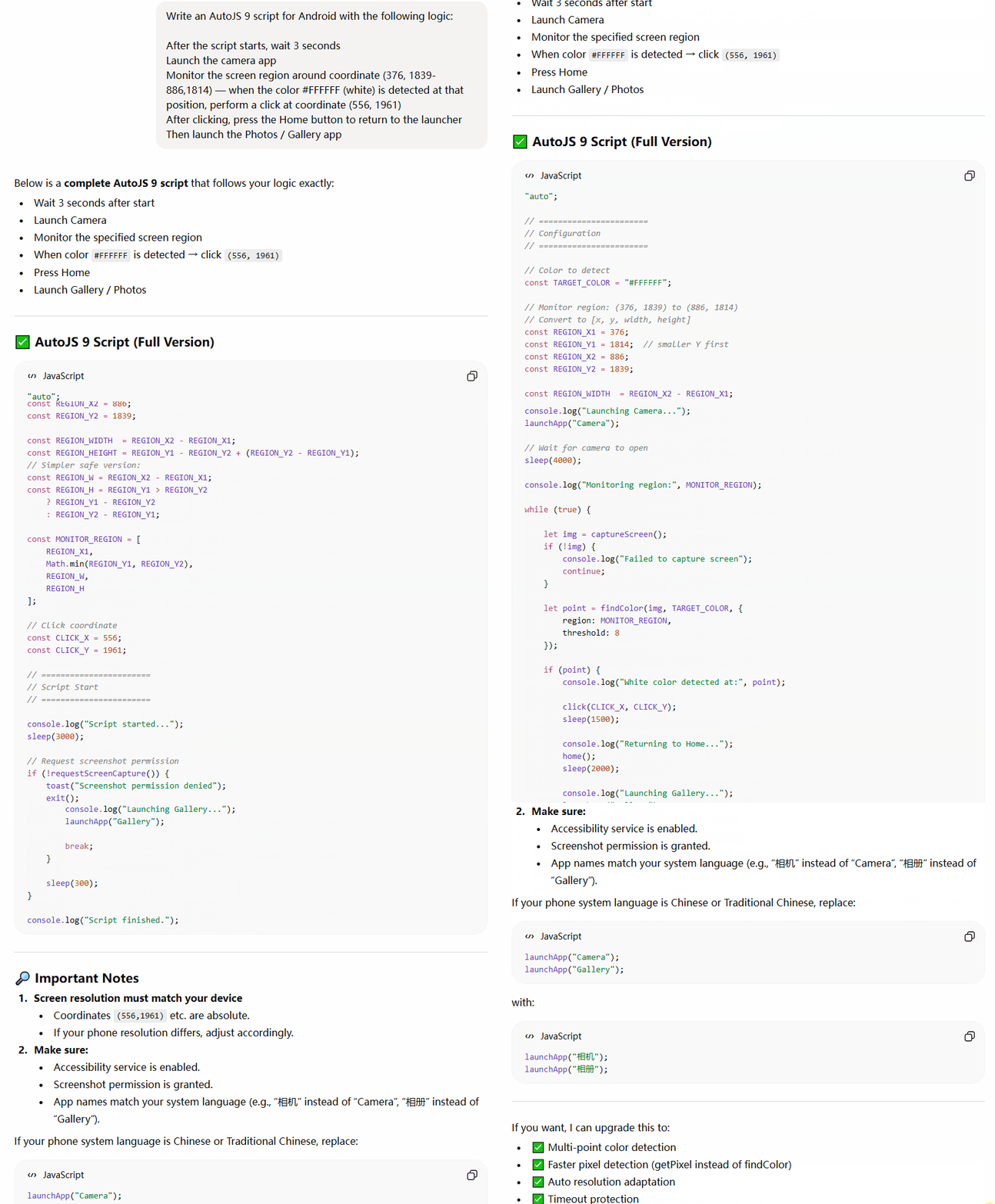
ChatGPT’s version looked more polished at first glance. Cleaner formatting, more comments, a configuration block at the top with named constants. It had "auto" at the top — which is the AutoJS directive that enables accessibility service mode. DeepSeek didn’t include that. Points to GPT.
It used findColor() instead of reading a single pixel, which is a different approach. findColor() scans a region and returns the first matching coordinate. More robust in theory, because it doesn’t require the white to appear at the exact pixel I specified — just somewhere in the region.
The region definition was where things got interesting. ChatGPT tried to calculate width and height from my coordinates, and the math got confused. It wrote:
That second line always equals zero. It’s dead code that ChatGPT left in and never cleaned up. If you used REGION_HEIGHT instead of REGION_H, your detection region would collapse to nothing and findColor() would never find anything.
It used launchApp("Camera") and launchApp("Gallery") — which is the convenience wrapper in AutoJS. This works when the device language is English and the app name matches exactly. ChatGPT did note at the bottom that you might need to switch to "相机" and "相册" for Chinese devices. That’s a real concern. But burying it in the notes instead of handling it in the code is the difference between a tutorial and a tool.
ChatGPT’s version — cleaner code, but the silent bug took longer to track down
The Part That Actually Surprised Me
I ran both scripts — on a real Android device, with real AutoJS 9 installed, accessibility service enabled.
DeepSeek’s version failed on the color conversion, as I suspected. The hex comparison broke silently. I fixed the color masking myself with a single line change, and after that it ran cleanly. Camera opened. Pixel monitoring started. When the white appeared, it clicked. Went home. Opened gallery.
Total fix time: maybe four minutes.
ChatGPT’s version failed on the region calculation — it was pulling REGION_WIDTH and REGION_HEIGHT instead of REGION_W and REGION_H in one place. The findColor() call was scanning a zero-height region and returning nothing every cycle. I found it because I added a console.log() to check the region values and saw [376, 1814, 510, 0]. That zero gave it away.
Once I fixed that, ChatGPT’s version also worked. But the fix took me longer to find because the error was silent — no crash, no toast, just an infinite loop doing nothing.
Here’s what surprised me: DeepSeek’s bug was more dangerous but easier to diagnose. ChatGPT’s bug was subtle and harder to track down precisely because the surrounding code looked so clean.
So Which One Actually Won?
Depends what you’re measuring.
If you’re a beginner who will copy-paste and run without reading — ChatGPT’s cleaner structure is more likely to confuse you, not less. The dead code, the silent region failure, the name-dependent app launching. It looks professional enough that you’d trust it. That trust is unearned.
If you know AutoJS even a little — DeepSeek’s version is easier to audit. The logic is more explicit. The bug is on the surface. The fallback package names are right there in the comments.
Neither model wrote production-ready code. Both needed fixes. That’s fine — I wasn’t expecting a senior Android developer. I was expecting a useful starting point.
DeepSeek gave me a rougher draft that was easier to repair. ChatGPT gave me a prettier draft with a harder-to-find fault. For actual use, I ended up combining both: DeepSeek’s color detection approach with ChatGPT’s findColor() region scanning and the "auto" accessibility directive.
The real answer is that neither AI understood the script well enough to know it would fail. They both generated plausible-looking code that didn’t quite work. That gap between “looks right” and “runs right” is still entirely on you to close.
If you’re building Android automation scripts with AutoJS 9, I’d use either model as a first draft generator — but plan to spend twenty minutes reading and testing before you trust anything. The prompt-to-working-code pipeline isn’t there yet, not for anything that touches device hardware.
One question I keep turning over: if you hadn’t known enough about AutoJS to spot the bugs, would you have concluded the tool doesn’t work — or that the AI failed you? Most people would blame the tool. That misattribution is probably costing a lot of developers hours they don’t know they’re losing.
Which one would you have trusted more on first read — the clean version or the explicit one?
Free AI Prompts
💻 Coding Prompts for ChatGPT & Claude
Copy-ready prompts you can use right now — free, no login needed